

Zoho Desk – Transform Customer Support with an Enterprise Helpdesk Solution
Customer support is no longer just about answering queries. Today, it plays a major role in shaping customer experience, building trust, and driving business growth. Companies that deliver fast, consistent, and personalized support always stay ahead of their competition. This is where Zoho Desk becomes a game-changing platform.
Zoho Desk is a cloud-based customer service software designed to help businesses manage, track, and resolve customer issues and queries efficiently. It brings all your support channels—email, chat, phone, and social media—into one unified system. This allows your team to handle every customer interaction without switching between multiple tools.
What makes Zoho Desk unique is its context-aware support mechanism. Every customer interaction is linked with their history, preferences, and previous tickets. This helps your agents understand the complete picture before responding, leading to faster and more accurate solutions.
Zoho Desk is also part of the broader Zoho ecosystem of applications ranging from CRM to ERP. This means it integrates easily with tools like Zoho CRM, Zoho Projects, and other business applications. As a result, your sales, support, and operations teams can work together with shared data and insights. Whether you are a startup, mid-sized company, or enterprise, Zoho Desk provides a flexible and scalable solution to manage customer support effectively.

Common Challenges Businesses Face in Customer Support
Before adopting a structured helpdesk system, many businesses struggle with inefficiencies that directly impact customer satisfaction.
- Lack of Centralized System: Support requests often come from multiple channels—emails, calls, WhatsApp, and social media. Without a centralised platform, it becomes difficult to track and manage all queries. This leads to missed tickets, duplicate responses, and confusion among teams.
- Slow Response and Resolution Times: Customers expect quick replies. However, manual processes and lack of automation slow down response times. Delays in resolving issues often result in customer dissatisfaction.
- Poor Visibility into Support Operations Managers cannot easily track:
- Ticket status
- Agent performance
- Resolution times
- Without visibility, it becomes difficult to improve service quality.
- Low Agent Productivity:
- Assigning tickets
- Sending follow-ups
- Updating status
- This reduces their ability to focus on solving complex issues.
- Inconsistent Customer Experience: Different agents may provide different answers for the same issue. This inconsistency reduces customer trust and brand value.
- Difficulty in Managing Multi-Channel Support: Handling each channel separately creates silos. Customers may need to repeat their issue multiple times, leading to frustration.
- Lack of Insights and Reporting: Without proper analytics, businesses cannot measure performance or identify areas for improvement.
Zoho Desk addresses all these challenges by providing a unified, automated, and intelligent support system.
Zoho Desk Features
Zoho Desk comes with a wide range of features designed to improve efficiency, accuracy, and customer satisfaction.
Zia Artificial Intelligence (AI)
|
AI Agents
|
Conversational AI
|
Predictive Intelligence
|
Omnichannel Support
|
Ticket Management
|
Reply Efficiency
|
Collaboration
|
|
Feedback Management
|
Accessibility Controls
|
Self-Service
|
Knowledge Base
|
Guided Conversations
|
ASAP (Help Widget)
|
Community
|
|
Custom Branding
|
Multilingual Help Center
|
Employee Self-Service Portal
|
Automation
|
Ticket Assignment
|
SLA Management
|
Blueprint
|
Workflows
|
Customization
|
Multilingual Help Desk
|
Multi-Department Setup
|
User Personalization
|
|
Custom Modules
|
Developer Toolkit
|
Analytics & Reporting
|
Data-Driven Insights
|
Built-in Reports
|
Custom Dashboards
|
Key Metrics Tracking
|
Integration
|
Seamless Integrations
|
Zoho Ecosystem Integrations
|
Third-Party Integrations
|
Mobile App Features
|
Zoho Desk Mobile App
|
Radar (Mobile Analytics App)
|
On-Demand Mobile Apps
|
Security & Compliance
|
Data Security
|
Access Control
|
Compliance
|
Benefits of Zoho Desk
Implementing Zoho Desk delivers long-term value by improving service efficiency, customer experience, and operational control.
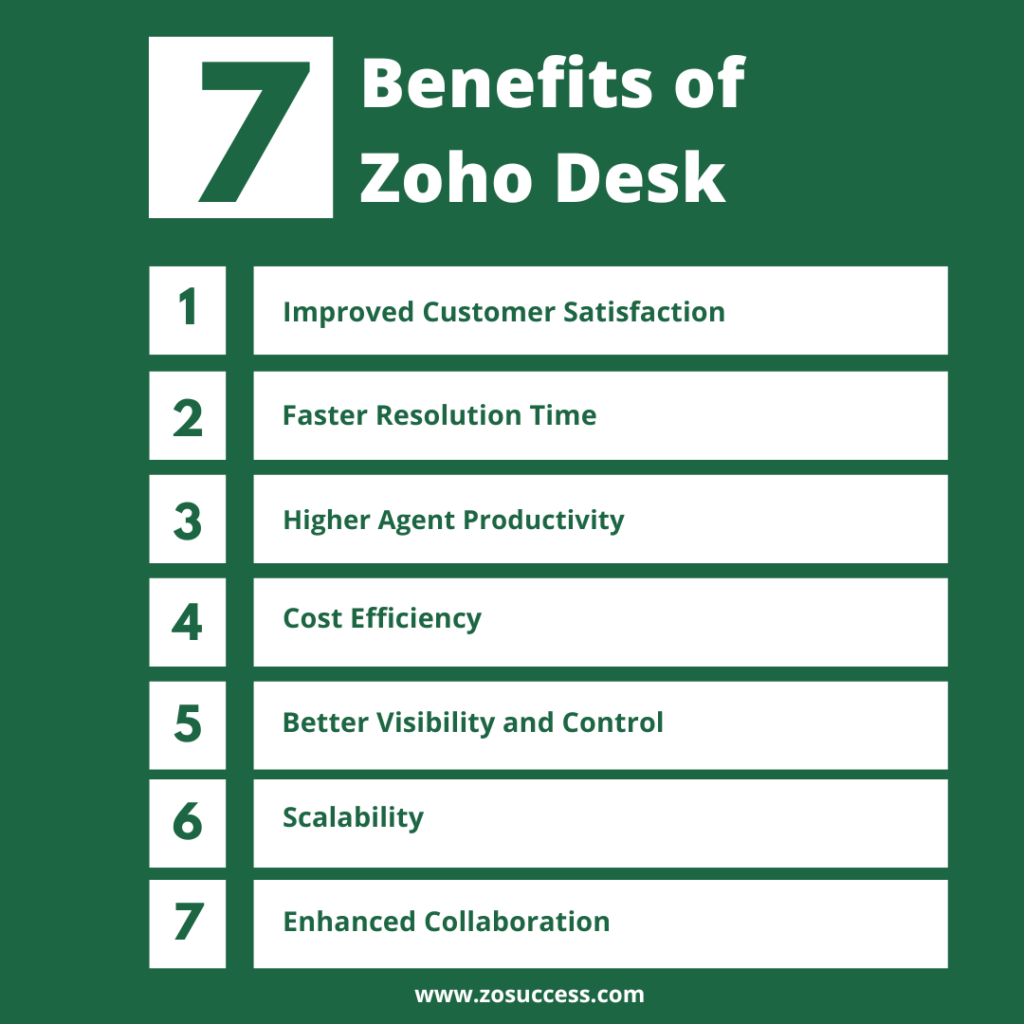
- Improved Customer Satisfaction: Faster responses and accurate issue resolution enhance the overall customer experience. Customers receive timely support across channels. This leads to higher satisfaction and stronger retention.
- Faster Resolution Time: Automation and AI-driven workflows help prioritise and resolve tickets Repetitive tasks are minimised, allowing quicker issue handling. This ensures customers get solutions without unnecessary delays.
- Higher Agent Productivity: Agents spend less time on manual tasks like ticket assignment and follow-ups. Intelligent automation and knowledge base access improve efficiency. This allows teams to focus on solving complex customer issues.
- Cost Efficiency: Zoho Desk provides enterprise-level support features at a competitive cost. Businesses can reduce operational expenses without compromising service quality. This makes Zoho Desk ideal for growing as well as enterprise level organizations.
- Better Visibility and Control: Managers gain real-time insights into ticket volume, response times, and team performance. Dashboards and reports help identify bottlenecks quickly. This enables proactive service management.
- Scalability: Zoho Desk is designed to grow with your business needs. You can start with basic features and expand as operations scale. The platform supports increasing users, channels, and workflows seamlessly.
- Enhanced Collaboration: Teams can collaborate efficiently using shared tickets, internal notes, and comments. Information flows smoothly between departments. This improves coordination and ensures consistent customer support.
Signup for Zoho Desk – Rest of World / India
Why Your Business Needs Zoho Desk
Customer support is no longer just a service function—it has become a key differentiator that directly impacts customer loyalty and business growth.

- Rising Customer Expectations: Customers expect quick, personalized support across multiple channels such as email, chat, and social media. Delayed or generic responses can lead to dissatisfaction. Meeting these expectations requires a modern, intelligent support system.
- Need for Automation: Manual processes slow down ticket handling and increase the risk of errors. Automation helps streamline workflows, assign tickets efficiently, and reduce response times. This improves both service quality and operational efficiency.
- Data-Driven Decisions: Businesses need real-time insights to monitor performance and improve service delivery. Reports and dashboards help identify trends, bottlenecks, and opportunities. This enables continuous improvement in customer support operations.
- Competitive Advantage: Organizations that deliver faster and better support gain a strong market advantage. High-quality customer service leads to increased retention and brand loyalty. It also enhances overall customer experience.
- Remote Work Enablement: Zoho Desk enables teams to work efficiently from anywhere. Cloud-based access, collaboration tools, and automation support remote and hybrid work models. This ensures uninterrupted service delivery.
Simply put, businesses that invest in modern support systems like Zoho Desk position themselves for long-term success and customer-centric growth.
Zoho Desk for Your Industry / Business Segments
Zoho Desk is highly flexible and can be tailored to meet the unique support needs of different industries.
- IT & Software Services: IT and software companies can manage technical support tickets efficiently with SLA tracking and automation. Zoho Desk helps prioritise issues, assign tickets intelligently, and reduce resolution time. This ensures better service delivery and improved customer satisfaction.
- Manufacturing: Manufacturing businesses can handle service requests, warranty claims, and maintenance support from a single platform. Zoho Desk provides visibility into service operations and customer issues. This improves after-sales service and operational efficiency.
- Healthcare: Healthcare organizations can manage patient queries while maintaining strict data security and compliance. Zoho Desk ensures sensitive information is handled securely. This helps deliver timely and reliable patient support.
- Education: Educational institutions can streamline student inquiries, admissions queries, and support requests. Zoho Desk helps manage high volumes of queries efficiently. This improves communication and enhances the student experience.
- E-commerce & Retail: Retail and e-commerce businesses can manage order tracking, returns, and customer queries seamlessly. Zoho Desk integrates multiple communication channels into one system. This ensures faster responses and better customer experience.
- BFSI (Banking & Finance): Financial institutions require secure and structured communication with customers. Zoho Desk provides controlled workflows, audit trails, and compliance support. This ensures reliable and compliant customer service.
- Not-for-Profit: Non-profit organizations can manage donor, volunteer, and beneficiary interactions effectively. Zoho Desk helps track communications and service requests in one place. This improves engagement and operational transparency.
Implementing Zoho Desk with ZoSuccess / Dhruvsoft
A successful Zoho Desk implementation requires the right partner to ensure a smooth deployment and maximum ROI. Dhruvsoft (ZoSuccess) follows a structured approach to deliver efficient, scalable, and user-friendly support systems.

- Step 1: Requirement Analysis: We begin by understanding your current support processes, challenges, and business goals. This helps identify gaps and opportunities for improvement. A clear foundation ensures the right solution design.
- Step 2: Solution Design: Based on your requirements, we design a customized Zoho Desk setup. Workflows, SLAs, and automation are aligned with your business needs. This ensures the system supports your support operations effectively.
- Step 3: Data Migration: We securely migrate your existing tickets, contacts, and knowledge base data. Data is validated to ensure accuracy and completeness. This ensures a seamless transition without disruption.
- Step 4: Integration Setup: Zoho Desk is integrated with your CRM, ERP, and other business tools. This enables smooth data flow and unified operations. Integration improves visibility and efficiency across departments.
- Step 5: Training & User Adoption: We provide role-based training to ensure your team is comfortable using the system. Change management practices help improve adoption. This ensures teams use Zoho Desk effectively from day one.
- Step 6: Go-Live & Continuous Support: We support you during go-live to ensure stability and smooth operations. Post-implementation, we provide continuous optimization and support. This helps you maximize long-term value from Zoho Desk.
Why Choose Dhruvsoft / ZoSuccess for Zoho Desk Implementation?
Selecting the right implementation partner is not just important—it directly impacts how successfully your customer support system performs in the long run. A powerful tool like Zoho Desk delivers real value only when it is implemented correctly, aligned with your business processes, and adopted effectively by your team.
At Dhruvsoft, we go beyond basic setup. We bring a strategic, business-first approach to every Zoho Desk implementation, ensuring that your support operations are not only streamlined but also future-ready.
What Makes Dhruvsoft Different?
- Certified Zoho Experts: Our team consists of certified professionals with hands-on experience in implementing Zoho solutions across industries. We understand the platform deeply and use best practices to deliver reliable, scalable implementations.
- Deep Industry Knowledge: We don’t believe in generic solutions. Our team has worked with businesses across IT, manufacturing, healthcare, e-commerce, and more. This allows us to design solutions that match real-world operational needs.
- Customized Solutions for Your Business: Every organization has unique workflows and customer expectations. We tailor Zoho Desk to fit your exact requirements—whether it’s automation, ticket routing, or reporting—ensuring maximum efficiency.
- Strong Integration Capabilities: Customer support does not operate in isolation. We help you integrate Zoho Desk with CRM, ERP, and other business systems, creating a connected ecosystem that improves visibility and collaboration.
- End-to-End Support: From initial consultation and system design to implementation, training, and post-go-live support—we stay with you at every step. Our goal is to ensure smooth adoption and continuous improvement.
- Focus on Business Outcomes: We don’t just focus on features—we focus on results. Whether it’s reducing response time, improving customer satisfaction, or increasing team productivity, our implementations are designed to deliver measurable business impact.
More Than Implementation—A Transformation Partner At Dhruvsoft, we don’t just implement software—we help you transform your customer support strategy. We align technology with your business goals and empower your team
Start Your Zoho Desk Journey with ZoSuccess
Customer support is a key driver of business success. With Zoho Desk and Dhruvsoft, you can transform your support operations into a competitive advantage.
Why Start Now?
- Improve customer satisfaction
- Increase team productivity
- Gain better visibility
- Scale your operations
Zoho Desk is more than just a helpdesk—it is a complete customer service platform designed for modern businesses. It helps you manage support efficiently, improve customer experience, and drive growth. With the right implementation partner like Dhruvsoft, you can unlock the full potential of Zoho Desk and build a support system that is fast, intelligent, and scalable.
Ready to transform your customer support or customer service function? Connect with Dhruvsoft today and take the first step toward smarter service management.
Frequently Asked Questions (FAQs) on Zoho Desk
1. What is the Zoho Desk used for?
Zoho Desk is used to manage customer support operations, handle tickets, and respond to customer queries efficiently. It supports multiple channels like email, chat, phone, and social media. This helps businesses deliver consistent and timely customer service.
2. Is Zoho Desk suitable for small businesses?
Yes, Zoho Desk is highly scalable and cost-effective, making it suitable for startups, SMBs, and enterprises. Businesses can start with basic features and expand as they grow. This flexibility makes it a long-term solution.
3. Can Zoho Desk handle multi-channel customer support?
Zoho Desk supports omnichannel communication, allowing you to manage queries from email, chat, phone, and social media in one place. This ensures a unified support experience. Teams can respond faster and more efficiently.
4. How does Zoho Desk improve customer satisfaction?
Zoho Desk reduces response times and ensures consistent communication. It also offers self-service options like knowledge bases and FAQs. This improves customer experience and satisfaction.
5. What is Zia in Zoho Desk?
Zia is the AI-powered assistant in Zoho Desk. It helps with automation, sentiment analysis, and response suggestions. This improves agent productivity and service quality.
6. Does Zoho Desk integrate with other applications?
Yes, Zoho Desk integrates seamlessly with Zoho CRM, Zoho Projects, and various third-party tools. This ensures smooth data flow across systems. Integration improves operational efficiency.
7. Is Zoho Desk customizable?
Zoho Desk allows customization of workflows, fields, layouts, automation rules, and reports. This ensures the platform aligns with your business processes. Customization improves usability and efficiency.
8. How secure is Zoho Desk?
Zoho Desk follows strong security practices, including data encryption and role-based access control. It also complies with global data protection standards. This ensures your customer data remains safe.
9. How long does it take to implement Zoho Desk?
Implementation timelines vary based on business requirements and complexity. Basic setups can be completed in a few days, while advanced configurations may take a few weeks. Working with experts like Dhruvsoft ensures faster and smoother deployment.
10. Do I need technical expertise to use Zoho Desk?
No, Zoho Desk is designed to be user-friendly and easy to adopt. With proper setup and training, teams can start using it efficiently. Support from partners like Dhruvsoft further simplifies adoption and usage.

 “ZOSuccess” is the Zoho Consulting Practice of Dhruvsoft Services Private Limited – a leading Zoho Advanced Partner from India – providing services worldwide …