
A real estate agent’s day can change quickly. A buyer enquiry may arrive from a property portal in the morning; a seller may request a valuation, several site visits may need coordination, and a promising deal may suddenly go quiet. At the same time, important customer details such as budget, preferred location, property requirements, documents, conversations, and follow-up dates can become scattered across WhatsApp, spreadsheets, notebooks, and emails.
This is where Zoho CRM for real estate agents can help. It brings buyer and seller leads, property requirements, site visits, follow-ups, and deals into one centralized system. With the right setup, agents can capture leads from different sources, qualify prospects, schedule property visits, track customer feedback, automate follow-ups, and manage opportunities through to closure. Managers can also get a clearer view of the sales pipeline and agent performance.
This guide explains how Zoho CRM can support real estate agents, brokerages, developers, and property consultants in managing buy and sell leads, site visits, follow-ups, negotiations, and closures while avoiding common CRM implementation mistakes.
Why Real Estate Agents Need a CRM?
Real estate is a relationship-driven business with long and unpredictable sales cycles. A buyer may enquire today, visit several properties over the next few months, and make a purchase much later. A seller may wait until the right time before listing their property. Consistent follow-up and organized customer information can make a major difference.
Without a CRM, common problems quickly arise:
- Scattered Leads: Leads from portals, social media, referrals, and walk-ins are stored in different places.
- Lost Customer History: Agents may not know who last contacted the customer or what was discussed.
- Missed Site Visits: Property visits can be managed through calls and messages, leading to missed or double-booked appointments.
- Missed Follow-Ups: Agents depend on memory or personal reminders to contact prospects.
- Poor Pipeline Visibility: Managers cannot easily see active deals, making sales forecasting difficult.
- Lost Customer Data: When an agent leaves, important contacts, conversations, and relationship history may leave with them.
A property CRM such as Zoho CRM brings customer information, property requirements, activities, follow-ups, and deal history into one system. This makes the CRM—not the individual agent—the central keeper of customer relationships and sales information.
What Makes Zoho CRM a Good Fit for Real Estate
Zoho CRM is a flexible cloud platform that agents can shape around the way property business actually works. Several things make it a strong choice for a real estate CRM in Zoho:
- It is customizable. You can add fields for budget, property type, preferred locality, possession timeline, and financing status, and create modules for properties and site visits.
- It scales. A solo agent can start small, and a brokerage can add roles and assignment rules, and, on higher editions, territories and approval processes.
- It connects to the wider Zoho ecosystem, including forms, email marketing, e-signature, accounting, and analytics.
- It has a mobile app, which matters because real estate work happens in the field.
- It comes in several editions, so agencies can start with the features they need and upgrade as the team grows.
Edition note: Some features in this guide depend on your Zoho CRM edition. Blueprint is available from Professional upward. Territory management, approval processes, email parsing, and full Zia AI scoring are available from Enterprise upward. Custom modules are available across paid editions, with limits that vary by plan. Confirm what is included in your plan before you design the setup.
Setting Up the Real Estate Data Model in Zoho CRM
Before you automate anything, decide how information will be structured. A clean data model is the foundation for everything else.
- Leads and Contacts: Use the Leads module for new enquiries that have not yet been qualified. Once someone shows real intent, convert the lead into a contact and a deal. Capture fields that matter for property, such as whether the person is a buyer, seller, landlord, or tenant, along with budget range, preferred areas, property type, and urgency.
- A Custom Properties Module: Create a custom module for properties. Each record can hold the address, locality, type, size, price, status, photos, owner, and listing agent. Link properties to deals and site visits, so you can see which properties interest which buyers and which buyers have already seen a given property.
- Deals: Deals represent live transactions: a buyer in negotiation, or a seller who has signed a listing. Each deal should show the contact, the property, the expected value, the expected commission, the stage, and the closing date.
- Site Visits: Treat site visits as their own object or track them as activities linked to the lead, the property, and the agent. Either way, the goal is to record who visited what, when, and what they thought of it.
Capturing Buy and Sell Leads From Every Source
Real estate leads can come from property portals, websites, social media, phone calls, referrals, and walk-ins. Zoho CRM can bring these leads into one centralized pipeline for easier tracking.
- Property Portals:Bring portal leads in through Zoho Marketplace extensions, the portal’s own CRM or API integration (often available on business or builder accounts), automation tools such as Zoho Flow, or email parsing on Enterprise editions.
- Website Enquiries: Use Zoho Forms or web forms to automatically create leads in CRM.
- Social Media: Capture leads from social campaigns and lead-generation ads.
- Calls and Messages: Record enquiries received through phone calls and messaging channels, or connect a telephony or WhatsApp integration so they are logged automatically.
- Walk-ins and Referrals: Add offline leads directly to the CRM and record their source.
Always capture the lead source. Over time, this helps identify which channels generate quality buyers and sellers rather than simply generating large lead volumes.
Separating Buy-Side and Sell-Side Leads
Buyers and sellers have different requirements and sales processes. Buyers typically need property options, comparisons, and site visits, while sellers need valuation, marketing, offers, and negotiation support.
Zoho CRM can use lead types or separate layouts to capture the right information for each audience. Buyer opportunities can move through requirement → shortlisting → site visit → negotiation → closure, while seller opportunities can follow valuation → listing → marketing → offers → closure.
Lead Assignment and Instant Response
Speed is important in real estate because prospects often contact multiple agents at the same time. Zoho CRM can automatically assign leads based on locality, property type, budget, language, or lead source.
Agents can receive instant notifications when a new lead is assigned. Automated acknowledgement messages can also be sent to the prospect, allowing the agent to follow up quickly while the enquiry is still fresh.
Qualifying Leads So Agents Spend Time Where It Counts
Not every enquiry has the same potential. Zoho CRM can help agents qualify leads using information such as:
- Budget and Financing: Cash, pre-approved loan, or financing required
- Buying or Selling Timeline: Immediate, short-term, or long-term requirement
- Preferred Location: Target areas and neighborhoods
- Property Type: Residential, commercial, land, rental, or other requirements
- Decision Makers: People involved in the buying or selling decision
- Existing Agent: Whether the prospect is already working with another agent
Lead scoring can then prioritize prospects based on their information and engagement. High-quality leads can receive faster attention, while less-ready prospects can be moved into automated nurturing campaigns. On Enterprise and above, Zia AI can add predictive lead scoring.
Managing Site Visits in Zoho CRM
Site visits are the heart of real estate sales, and they are where many agencies lose control. A structured process makes them reliable.
- Scheduling Visits : Create a visit as a linked activity or custom record connected to the lead, the property, and the agent. Include date, time, meeting point, and any access details. Send the buyer an automatic confirmation by email or message, and a reminder the day before and a few hours ahead.
- Avoiding Double Bookings : Use calendar views and integrations so agents can see their own schedule and their colleagues’ availability. For popular properties, a shared visit calendar prevents unintended clashes between buyers and owners.
- Planning Routes and Recording Check-Ins : When a buyer wants to see four properties in one afternoon, group them by location so the agent is not crossing the city repeatedly. Field teams can use the mobile app to check in at visits, which gives managers confidence that visits are happening and supports commission discussions later.
- Capturing Feedback After Every Visit : After each visit, the agent records feedback: what the buyer liked, what they disliked, whether they want a second visit, and whether they are ready to negotiate. Over time, this builds a picture of what each buyer actually wants, which often differs from the original brief. It also tells sellers honestly how the market is reacting to their property.
- Following Up Automatically : A visit should always trigger the next step. A workflow can create a follow-up task for the day after the visit, send a thank-you message with similar listings, or alert the manager if a hot lead has not been contacted.
Moving Deals Through the Pipeline to Closure
A clear pipeline makes the status of every deal visible. A typical buyer pipeline might look like this:
- New enquiry
- Qualified
- Property shortlisted
- Site visit scheduled
- Site visit completed
- Negotiation
- Offer accepted or booking
- Documentation and payment
- Closed won, or closed lost
A seller pipeline can run: valuation, listing agreement, marketing, enquiries received, offer, negotiation, sale agreement, closed.
Enforcing the Process With Blueprint
Zoho CRM’s Blueprint feature, available from the Professional edition upward, lets you define the exact steps a deal must follow, with required fields and checks at each stage. For example, a deal cannot move to negotiation until a visit is recorded, and cannot be marked closed until key documents are attached. This keeps the process consistent across agents, which matters most for brokerages with newer team members.
Managing Negotiation and Offers
Record each offer and counter offer as notes or in a related list on the deal. When several people are involved on the buyer or seller side, link every decision maker to the deal so nobody is forgotten.
Handling Documentation and Closing
Closing involves agreements, identity documents, payment schedules, and approvals. Attach documents to the deal record and use checklists to track each requirement. With Zoho Sign, agreements can be sent for electronic signature where legally accepted in your market. Zoho Books can handle invoices and commission billing.
Learning From Lost Deals
Always capture a loss reason: price, location, financing, another agent, or a change of mind. If many buyers drop out at financing, you may want to involve a lender earlier.
Automation for Consistent Follow-Ups
Automation helps real estate agents stay consistent with follow-ups while reducing repetitive manual work. Useful workflows include:
- New Lead Alerts: Send a welcome message and create a follow-up task when a new lead arrives.
- Follow-Up Reminders: Remind agents when a lead has not been contacted within a defined time.
- Visit Reminders: Send confirmations and reminders for property visits and appointments.
- Birthday & Anniversary Greetings: Automatically send personalized messages to existing and past clients.
- Stalled Deal Alerts: Notify agents or managers when an opportunity remains in the same stage for too long.
- Approval Workflows: On Enterprise and above, route discounts, special pricing, or large deals to managers for approval.
Automation does not replace the agent’s personal relationship with the customer. It simply reduces missed follow-ups and routine tasks that can otherwise lead to lost opportunities.
Marketing and Nurturing Long Sales Cycles
Not every real estate lead is ready to buy, sell, or rent immediately. Some may need weeks or months to make a decision. Zoho CRM can work with Zoho Campaigns and other marketing tools to keep these leads engaged until they are ready to take the next step.
- Cadences: Use Cadences in Zoho CRM to run a scheduled sequence of follow-up emails, calls, and tasks for each lead, and end the sequence when the lead responds.
- New Listing Alerts: Send property recommendations based on the buyer’s preferred location, budget, property type, and requirements. This keeps leads informed about properties that are actually relevant to them.
- Market Updates: Share property price trends, market updates, investment insights, and neighborhood guides. Useful content can keep your brand in front of prospects even when they are not actively searching for a property.
- Drip Campaigns: Create automated email campaigns for leads who completed a site visit, requested property information, or showed interest in a particular location. Follow-ups can be scheduled over several days or weeks.
- Lead Re-Engagement: Older leads do not always mean lost leads. When a new property matches their previous requirements, agents can reconnect with them through personalized messages and relevant listings.
- Buyer and Seller Nurturing: Different campaigns can be created for buyers, sellers, investors, landlords, and tenants. Each group can receive information based on their specific needs and stage in the property journey.
Because Zoho CRM stores customer preferences, previous conversations, property interests, and activities, marketing teams can create more personalized campaigns instead of sending the same message to every lead. This helps agents stay connected and improve the chances of converting leads when they are ready to act.
Managing Owners, Landlords and Rentals
Real estate agencies often manage rentals alongside property sales, making it important to track landlords, tenants, properties, and lease information in one place. Zoho CRM can help agents maintain these records and manage rental-related activities.
- Landlord Management: Store landlord details, properties, requirements, and communication history.
- Tenant Management: Track tenant information, property preferences, enquiries, and interactions.
- Lease Tracking: Maintain lease start and expiry dates and set reminders for upcoming renewals.
- Renewal Follow-Ups: Contact landlords and tenants before a lease expires to manage renewals or find new tenants.
- Re-Leasing Opportunities: When a tenant is moving out, agents can start marketing the property to potential tenants early.
- Future Sales Opportunities: A satisfied tenant can become a future buyer, while landlords may have additional properties to sell or lease.
By managing rentals and sales within the same CRM, agents can maintain stronger relationships and identify opportunities throughout the customer’s property journey.
Zoho CRM for Real Estate in India
Indian agencies have a few specific needs to plan for:
- Property Portals: 99acres, MagicBricks, and Housing.com are often the biggest and most expensive lead sources. Plan how each one will deliver leads into CRM, and tag every lead by portal so you can compare cost against bookings, not just enquiries.
- WhatsApp: Most buyer conversations happen on WhatsApp. A WhatsApp Business integration keeps those conversations on the customer record instead of agents’ personal phones.
- Telephony: Connect your cloud telephony provider so calls are logged, recorded, and linked to leads automatically.
- RERA Details: Add RERA registration numbers and project details to property and project records, so agents always share accurate information.
- NRI Buyers: Track time zone and preferred contact channel for overseas buyers, and schedule follow-ups to match.
Dashboards and Reports for Agents and Brokers
Reports help real estate teams turn daily activities into useful business insights. Zoho CRM dashboards can give agents and managers a clear view of leads, properties, sales, and performance.
- Pipeline by Stage: Track deals by stage, agent, and property type to see which opportunities are moving forward.
- Lead Source Performance: Identify which sources generate the most leads and which sources produce better conversions.
- Site Visits vs. Closures: Compare completed property visits with closed deals to understand sales effectiveness.
- Enquiry-to-Closure Time: Track how long it takes to convert an enquiry into a successful deal.
- Expected Commission: View expected commissions by month to help agents and managers plan revenue.
- Agent Activity: Monitor calls, property visits, follow-ups, meetings, and other sales activities.
- Lost Deal Reasons: Understand why deals are lost, such as pricing, property mismatch, competition, or lack of follow-up.
Site-Visit-to-Closure Ratio
The site-visit-to-closure ratio is especially useful for real estate teams. If many customers visit properties but only a few deals close, the data can help identify whether the issue is property pricing, lead qualification, property suitability, or follow-up.
For deeper reporting and advanced analytics, Zoho Analytics can combine CRM data with other business information to provide more detailed performance insights.
Mobile CRM for Agents in the Field
Real estate agents spend much of their time meeting customers and visiting properties rather than sitting at a desk. The Zoho CRM mobile app helps them access and update customer information directly from their phones.
- Access Leads: View lead details, property requirements, and customer history while on the move.
- Log Calls and Activities: Quickly record calls, meetings, visits, and follow-ups.
- Update Customer Information: Add notes, update lead status, and record important customer feedback immediately.
- Manage Visits: Check schedules and update property visit details from the field.
- Follow Daily Tasks: View upcoming activities and follow-ups without returning to the office.
The key is to keep mobile layouts simple. Put the most important fields and actions at the top so agents can update CRM records quickly and consistently.
Data Security and Team Access
Customer and property information is sensitive, so real estate businesses need proper access controls. Zoho CRM allows companies to control what different users can view, edit, or manage.
- Role-Based Access: Agents can access their assigned leads, while managers can view their team’s records.
- Management Access: Business owners and administrators can have broader access to customers, properties, and sales data.
- Data Restrictions: Access to sensitive records and information can be limited based on roles and business requirements.
- Export Controls: Businesses can restrict data export permissions to help protect customer and contact information.
- User Management: Access can be updated or removed when employees change roles or leave the organization.
These controls help protect customer data while ensuring each team member has access to the information they need to do their job.
Common Mistakes When Setting Up a Real Estate CRM
Many real estate CRM implementations fail because of simple setup and adoption issues. Avoiding these common mistakes can make the CRM more useful for both agents and managers.
- Using a Generic Sales Process: A standard sales pipeline may not match property enquiries, site visits, negotiations, and closures. Build the CRM around the actual real estate sales process.
- Adding Too Many Fields: Too many mandatory fields make CRM updates time-consuming. Keep only the information agents genuinely need to capture.
- Ignoring Lead Sources: Without tracking where leads come from, it becomes difficult to know which marketing channels generate quality prospects.
- Not Tracking Site Visits: Site visits are an important part of real estate sales. Capture visit details and customer feedback to understand why deals move forward or fail.
- Unclear Lead Assignment: Without clear assignment rules, agents may cherry-pick leads while others are ignored. Define rules based on territory, property type, or other business criteria.
- Poor Data Quality: Duplicate records, missing contact details, and outdated information reduce CRM reliability. Regular data cleaning and validation are essential.
- Ignoring Training and Adoption: Even a well-designed CRM will fail if agents do not use it consistently. Provide proper training and ensure managers regularly monitor CRM adoption. Review dashboards in weekly team meetings and make Zoho CRM the single source of truth for customer and property information.
Example: Before and After
Consider a small brokerage with six agents. Leads arrive from two portals, social media and referrals, and each agent keeps their own spreadsheet. Site visits are arranged by phone, and managers learn about deals only when agents mention them. Several leads are called by two agents, and others are never called.
After a Zoho CRM implementation, every lead lands in one system, is assigned by locality and source, and triggers an instant alert. Site visits are scheduled with reminders and feedback, deals follow a Blueprint, and managers review a weekly dashboard.The brokerage can now see which sources are worth paying for, which agents need coaching, and which deals are at risk. Results vary by business, but this is the type of visibility a well-run implementation is designed to deliver.
Implementation Roadmap
A structured approach keeps the project on track.
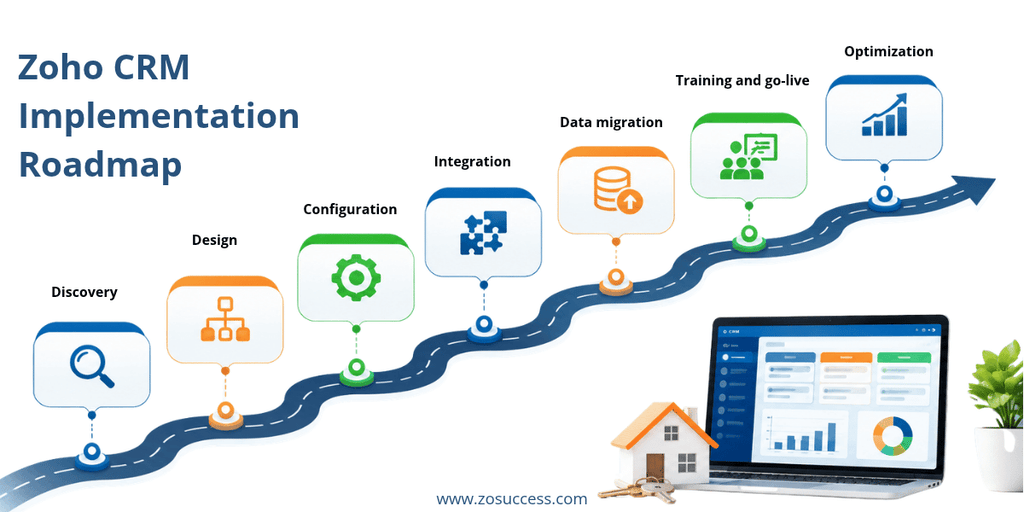
- Discovery: understand your buy, sell, and rental processes, team roles, lead sources, and reporting needs.
- Design: define modules, fields, pipelines, roles, and automation rules, and choose the right edition.
- Configuration: set up Zoho CRM, custom modules, layouts, Blueprints, workflows, and dashboards.
- Integration: connect your website, portals, email, forms, WhatsApp, telephony, e-signature, and accounting tools.
- Data migration: clean and import existing contacts, leads, properties, and deals.
- Training and go-live: train each role and support users during the first weeks.
- Optimization: review adoption and reports, and refine the setup over time.
Frequently Asked Questions
Is Zoho CRM suitable for real estate agents?
Yes. Zoho CRM can be customized with property-specific fields, modules, pipelines, and automation, which makes it suitable for individual agents, brokerages, and developers.
Can Zoho CRM manage both buyers and sellers?
Yes. You can use lead types, layouts, and separate pipelines so buy-side and sell-side deals follow different processes.
Can I schedule and track site visits in Zoho CRM?
Yes. Visits can be recorded as activities or custom records linked to the lead, property, and agent, with reminders, check-in, and feedback tracking.
Can Zoho CRM capture leads from property portals?
Yes, though the method depends on the portal. Options include Zoho Marketplace extensions, the portal’s own CRM or API integration, automation tools, and email parsing on Enterprise editions. Your implementation partner can confirm what works for the portals you use.
Which Zoho CRM edition do real estate agencies need?
Standard covers lead capture, pipelines, workflows, and dashboards. Professional adds Blueprint for process enforcement. Enterprise adds territories, approval processes, email parsing, and full Zia AI. The right choice depends on team size and how much process control you need.
Does Zoho CRM have a mobile app?
Yes. The mobile app helps agents manage leads, log calls, view schedules, and update records while in the field.
How long does a Zoho CRM implementation take for a real estate business?
It depends on your team size, integrations, and data volume. A simple setup can be live quickly, while a larger brokerage with several integrations needs more time.
Conclusion: Turn Enquiries Into Closed Deals
Real estate success depends on responding quickly, remembering every detail, and following up at the right time. Zoho CRM helps agents capture leads from every source, separate buyers and sellers, schedule and learn from site visits, and move deals to closure with a clear process. With automation, mobile access, and dashboards, agents spend less time on administration and more time with clients.
Ready to bring order to your property business? ZoSuccess helps real estate agents and brokerages implement Zoho CRM tailored to buy and sell leads, site visits, and deal closures. We handle everything from pipeline and Blueprint design to portal integrations, data migration, and training. Talk to our Zoho experts at www.zosuccess.com to plan your CRM setup.


 “ZOSuccess” is the Zoho Consulting Practice of Dhruvsoft Services Private Limited – a leading Zoho Advanced Partner from India – providing services worldwide …