
For years, building a custom business application meant one thing: a long, expensive software development project. You would write a detailed requirements document, hand it to developers, wait weeks for a prototype, go through rounds of changes, and finally deploy something months later — only to discover the business need had already shifted. That model is broken for most mid-sized businesses. And Zoho Creator is one of the platforms that is actively replacing it.
Zoho Creator is a low-code application development platform that allows IT teams, business analysts, and even technically inclined non-developers to build fully functional, database-driven business applications with a fraction of the time and effort traditionally required. Whether you need a field service management app, a vendor onboarding portal, an internal request management system, or a custom CRM extension, Creator gives your team the tools to build it — and deploy it — without writing thousands of lines of code.This article covers what Zoho Creator is, how it works, which use cases it fits best, and why growing businesses across India and globally are choosing low-code development as their primary strategy for building internal tools.
What Is Zoho Creator? A Quick Overview
Zoho Creator is a cloud-based, low-code application development platform that is part of the broader Zoho ecosystem. It enables users to build multi-platform apps that run on web browsers, iOS, and Android — all from a single build environment.
Unlike traditional development, where separate codebases are needed for each platform, Creator generates cross-platform apps from one configuration. It uses Deluge (Data Enriched Language for the Universal Grid Environment), a purpose-built scripting language that handles business logic in a syntax that is readable, concise, and learnable by professionals who are not career software engineers.
Key capabilities of the platform include:
- Drag-and-drop form and UI builder
- Visual workflow automation using Deluge scripting
- Built-in report and dashboard builder
- Native integration with Zoho CRM, Zoho Books, Zoho Analytics, and 600+ third-party apps via Zoho Flow and REST APIs
- Role-based access control and user permission management
- Offline-capable mobile apps
- AI-assisted app generation through Zia, Zoho’s AI engine
What makes this significant is the shift in who builds apps. Rather than IT departments being the bottleneck for every business tool request, Creator puts the power of app development in the hands of people closest to the business problem.
The Low-Code Development Advantage for IT Teams
Traditional custom application development has always carried four heavy costs: time, money, skilled developer availability, and ongoing maintenance. Low-code platforms like Zoho Creator attack all four simultaneously.
Speed of Delivery
Applications that would take three to six months through a traditional development cycle can be built, tested, and deployed in one to four weeks on Zoho Creator. This is not an exaggeration — it is a function of what you no longer need to do. You are not writing boilerplate database schemas from scratch, building user authentication systems, coding responsive layouts, or managing server infrastructure. Creator handles all of that. Your team focuses only on the business logic that is unique to your organization.
Reduced Dependency on Developer Resources
Developer talent in India and globally is expensive and in short supply. IT teams at mid-sized businesses often cannot compete with technology companies for developer hiring. Zoho Creator allows a business analyst, operations manager, or IT generalist to become a productive app builder with a few weeks of learning. This dramatically expands your organization’s ability to digitize processes without waiting for developer bandwidth.
Lower Total Cost of Ownership (TCO)
Custom software development costs for a moderately complex internal tool can easily run into several lakhs or more, depending on the scope, developer rates, and revisions. Zoho Creator’s subscription model — combined with the reduced build time — dramatically lowers both upfront and ongoing costs. Maintenance is also simpler because Creator handles platform updates, mobile compatibility, and security patches as part of the service.
Agility for Changing Business Needs
Business requirements change. A tool built on traditional code tends to become rigid and expensive to modify once deployed. Apps built in Zoho Creator can be modified in hours or days without rebuilding from scratch, which means your applications stay aligned with your business processes as they evolve.
Real-World Use Cases: What Businesses Are Building with Zoho Creator
One of the most common questions we hear from prospects is: what kind of apps can actually be built on this platform? The answer is more type of apps, than most people expect. Here are the most common and impactful use cases we see across industries.
1. Field Service and Technician Management Apps
Companies with field teams — whether in HVAC, manufacturing, utilities, or property management — need a way to schedule jobs, assign technicians, capture service reports on-site, collect customer signatures, and feed data back to finance for invoicing. This is a perfect use case for Zoho Creator. A Creator-built field service app can replace a tangle of WhatsApp messages, Excel sheets, and manual data entry with a structured mobile-first workflow that works even in low-connectivity environments.
2. Vendor and Supplier Onboarding Portals
Onboarding a new vendor involves collecting documents, verifying compliance, capturing bank details, setting up approvals, and communicating status — a process that is messy when managed through email. A Zoho Creator vendor portal gives suppliers a self-service interface to submit information, upload documents, and track their onboarding status, while your procurement team manages the approval workflow in a single dashboard.
3. Internal Request and Ticketing Systems
IT helpdesk requests, facility management requests, HR document requests, travel approvals — every organization has a category of internal requests that gets mismanaged through informal channels. A custom request management app in Zoho Creator brings structure, accountability, and visibility to these workflows, with SLA tracking and escalation rules built in.
4. Inventory and Asset Tracking Applications
Off-the-shelf inventory software is often either too expensive or too generic. With Zoho Creator, businesses can build an inventory app that matches their specific product categories, warehouse locations, reorder logic, and reporting needs exactly. Whether it is spare parts management for a manufacturing company or IT asset tracking for an enterprise, Creator gives you a custom-fit solution at a fraction of the cost of a packaged tool.
5. CRM Extensions and Custom Sales Tools
Zoho CRM is excellent for managing pipelines, but every business has unique sales workflows that a standard CRM does not cover natively. Zoho Creator integrates tightly with Zoho CRM, allowing you to build companion apps for quote configuration, sample request management, dealer performance tracking, channel partner portals, or any custom sales tool that extends what CRM does out of the box.
6. Compliance and Audit Management Apps
Industries with regulatory requirements — manufacturing, pharmaceuticals, construction, food processing — need tools for checklists, inspection records, corrective actions, and audit trails. Creator makes it easy to build audit management apps that capture structured data from mobile devices, enforce sequential approval workflows, generate PDF reports, and maintain an immutable audit log for compliance purposes.
How Zoho Creator Integrates with Your Existing Zoho Stack
For businesses already using Zoho products, Creator becomes even more powerful because of how deeply it connects with the rest of the Zoho ecosystem. This is not a surface-level connector — it is native integration built into the platform architecture.
A Creator app can read and write data directly to Zoho CRM records, so your field team’s service report in Creator automatically updates the related account in CRM. It can trigger a Zoho Books invoice when a job is marked complete. It can send data to Zoho Analytics for advanced reporting and visualization. It can trigger Zoho Cliq notifications when a form is submitted or an approval is pending.
Beyond the Zoho ecosystem, Creator connects to external services through REST API calls coded in Deluge and through Zoho Flow, which provides a no-code integration layer with hundreds of third-party applications. This means your Creator app can send emails via SendGrid, push data to your ERP, receive webhooks from your e-commerce platform, or sync with Google Workspace — all without requiring a separate middleware platform.
Zoho Creator vs. Other Leading Low-Code Platforms
| Feature | Zoho Creator | Microsoft Power Apps | OutSystems | Appian | Bubble |
|---|---|---|---|---|---|
| Best For | SMBs & Mid-Market Businesses | Microsoft-Centric Organizations | Large Enterprises | Process Automation & BPM | Startups & Web Apps |
| Pricing | Affordable | Moderate | High | High | Affordable |
| Ease of Use | Very Easy | Moderate | Moderate | Moderate | Easy |
| Visual App Builder | ✓ | ✓ | ✓ | ✓ | ✓ |
| Custom Scripting | Deluge | Power Fx | .NET/Java Extensions | Expression Language | JavaScript Plugins |
| Zoho Ecosystem Integration | Native | Limited | Third-Party | Third-Party | Third-Party |
| Microsoft 365 Integration | Available | Native | Available | Available | Limited |
| Workflow Automation | Strong | Strong | Advanced | Advanced | Moderate |
| Mobile App Support | Native iOS & Android | Native | Native | Native | Progressive Web Apps |
| Database Management | Built-in | Dataverse Required | Built-in | Built-in | Built-in |
| AI Capabilities | Zoho AI & OpenAI Integration | Microsoft Copilot | AI-Assisted Development | AI Process Insights | Plugin-Based |
| Scalability | Medium to High | High | Enterprise Grade | Enterprise Grade | Medium |
| Deployment Speed | Fast | Fast | Medium | Medium | Fast |
| Learning Curve | Low | Medium | High | High | Low |
| Ideal User | Business Teams & Citizen Developers | Microsoft Users | Enterprise IT Teams | Process-Centric Enterprises | Entrepreneurs & Startups |
Quick Comparison Summary
| Evaluation Criteria | Winner |
|---|---|
| Lowest Total Cost of Ownership | Zoho Creator |
| Best for Existing Zoho Customers | Zoho Creator |
| Best for Microsoft Ecosystem Users | Microsoft Power Apps |
| Best for Enterprise-Scale Applications | OutSystems |
| Best for Complex Business Process Management | Appian |
| Best for Startup Web Applications | Bubble |
| Fastest Learning Curve | Zoho Creator |
| Fastest Time-to-Value | Zoho Creator |
Why Businesses Choose Zoho Creator
- Lower licensing costs compared to enterprise low-code platforms.
- Native integration with Zoho CRM, Zoho Books, Zoho Inventory, Zoho Desk, and Zoho One.
- Rapid application development with minimal coding.
- Built-in workflow automation, reporting, and mobile app deployment.
- Ideal for HR, CRM, field service, project management, inventory, and approval workflows.
- Suitable for both citizen developers and IT teams.
Bottom Line: If your organization already uses Zoho applications or wants a cost-effective low-code platform that can quickly digitize business processes without enterprise-level complexity, Zoho Creator offers one of the strongest value propositions in the low-code market.
How to Get Started: The Typical Implementation Journey
Businesses working with a Zoho Advanced Partner like Dhruvsoft typically follow a structured approach to Creator implementation that minimizes risk and accelerates time to value.
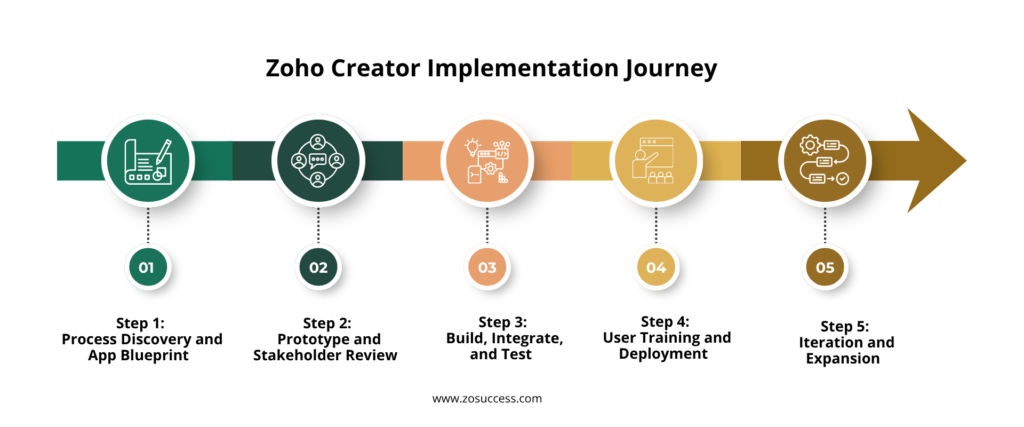
Step 1: Process Discovery and App Blueprint
Before building anything, the team maps the process that needs to be digitized. What data needs to be captured? Who captures it, and at which stage? Who approves it? What notifications need to go out? What reports do managers need? This discovery phase typically takes two to five days and results in a clear blueprint for the app — its forms, workflows, user roles, and integration touchpoints.
Step 2: Prototype and Stakeholder Review
A working prototype of the core application is built quickly — often within the first week. This prototype was shared with key stakeholders for feedback. Because Creator allows rapid changes, feedback from this stage can be incorporated in hours rather than weeks. This iterative approach dramatically reduces the risk of building the wrong thing.
Step 3: Build, Integrate, and Test
With the blueprint and approved prototype in hand, the full application is built. This includes setting up all forms and reports, configuring Deluge workflows, integrating with connected systems like Zoho CRM or third-party APIs, setting up user roles and permissions, and testing across web and mobile.
Step 4: User Training and Deployment
A Creator app is only valuable if people use it. Training is structured for different user types: administrators who manage the app, power users who run reports and manage records, and end users who primarily capture data via mobile. Deployment is cloud-based, so there is no complex server setup involved — users simply access the app through a browser or download the Creator mobile app.
Step 5: Iteration and Expansion
One of the underappreciated advantages of low-code is what happens after go-live. Because changes are easy to make, businesses naturally expand their Creator apps over time — adding new forms, new automations, new reports, and new integrations. What starts as a single-use case tool often evolves into a multi-module operations platform that spans departments.
Why Work with a Zoho Advanced Partner like Dhruvsoft / ZoSuccess for Creator Projects
Zoho Creator is a capable platform, but getting the most out of it requires more than access to the tool. Poorly designed forms lead to bad data. Workflows built without thinking through edge cases break in production. Integrations configured incorrectly cause data duplication or synchronization failures. And an app that users find confusing will simply not get used, regardless of how technically correct it is.
Working with a certified Zoho Advanced Partner like Dhruvsoft brings a structured methodology, deep platform knowledge, and implementation experience across industries. As a Zoho Advanced Partner based in Hyderabad, we have built Creator applications for businesses in manufacturing, distribution, services, and technology — each with unique process requirements and integration needs.
Beyond implementation, we help clients think about their broader Zoho strategy. Creator rarely exists in isolation — it works best as part of a connected Zoho environment. Our team helps you plan how Creator fits alongside Zoho CRM, Zoho Books, Zoho Analytics, or Zoho Desk, so that your business data flows seamlessly across the tools your teams use every day.
Conclusion: Low-Code Is Not a Shortcut — It Is a Smarter Path
The narrative around low-code platforms sometimes implies that they are a compromise — something you use when you cannot afford real development. That characterization misses the point entirely.
Zoho Creator is not a shortcut to a lesser application. It is a fundamentally different and more efficient way of building business tools — one that is better suited to the pace at which businesses actually operate and change. When your field operations team needs a mobile app to replace their paper checklists, they do not need a six-month software project. They need a solution next month. Creator makes that possible.
The businesses that move fastest are the ones that stop waiting for IT development queues to clear and start building the tools they need — through platforms that are purpose-built for exactly this kind of rapid, practical application development.
If your organization is carrying a backlog of digitization needs that have not been addressed because traditional development is too slow or too expensive, it is worth having a conversation about what is possible with Zoho Creator.
Ready to Build Your First Business App?
Dhruvsoft is a Zoho Advanced Partner based in Hyderabad with hands-on experience implementing Zoho Creator solutions for growing businesses across India. Whether you have a specific use case in mind or want to explore what is possible, our team can help you move from idea to working application quickly. Contact us to schedule a free discovery session.


 “ZOSuccess” is the Zoho Consulting Practice of Dhruvsoft Services Private Limited – a leading Zoho Advanced Partner from India – providing services worldwide …