
Why Businesses Outgrow Excel and Legacy CRMs ?
Many growing businesses start out managing customer information in Excel spreadsheets, or in an early CRM system that seemed like plenty at the time. For a while, it works. Then the sales team grows, the customer list multiplies, and what used to be a simple, manageable spreadsheet turns into five different versions floating around in different inboxes, each one slightly out of date.
As customer volumes, sales teams, and business processes expand, the cracks in these early systems start to show. Duplicate records pile up, customer data becomes inconsistent from one file to the next, collaboration between sales, marketing, and support becomes a matter of forwarding attachments back and forth, and reporting turns into a manual, error-prone exercise every month rather than something leadership can rely on in real time. What felt like a minor inconvenience at ten customers becomes a genuine operational risk at a thousand.
Zoho CRM offers a modern, cloud-based alternative that centralizes customer data, automates sales processes, and gives every team real-time visibility into pipeline, performance, and customer history. It is built to scale with a business rather than becoming another system to outgrow within a couple of years, which is a big part of why so many companies moving off Excel or an aging CRM choose it as their next platform.
This guide walks through the signs it is time to migrate, how to prepare, a step-by-step migration process, the most common challenges businesses run into, and how ZoSuccess helps ensure the move to Zoho CRM happens smoothly, without losing the data your business depends on.
Why Businesses Move from Excel or Legacy CRMs to Zoho CRM
Common Challenges with Excel
- Time-Consuming Manual Data Entry – Teams spend hours updating customer information manually, increasing the risk of errors.
- Multiple Spreadsheet Versions – Different copies of the same file create confusion, with no single source of truth.
- No Centralized Customer Database – Sales, marketing, and support teams cannot access consistent customer information in one place.
- Limited Team Collaboration – Employees often work on separate files, making collaboration inefficient and causing duplicate work.
- No Workflow Automation – Tasks such as lead assignment, follow-ups, and deal progression require manual effort instead of automated workflows.
- Difficult Reporting & Forecasting – Generating sales reports and forecasts involves manually combining data from multiple spreadsheets.
- Higher Risk of Data Loss – Files can be accidentally overwritten, deleted, corrupted, or lost, putting valuable customer data at risk.
- Poor Scalability – As customer data grows, spreadsheets become difficult to manage and slow to use.
- Limited Data Security – Controlling user access and protecting sensitive customer information is challenging.
- No Real-Time Insights – Decision-makers lack live dashboards and analytics to monitor sales performance and customer trends.
Challenges with Legacy CRM Systems
- Outdated User Interface – An old-fashioned interface reduces productivity and makes daily tasks more time-consuming.
- High Maintenance Costs – Businesses spend more on maintenance and support than the value the CRM delivers.
- Limited Scalability – The CRM struggles to support business growth, additional users, or multiple locations.
- Poor Integration Capabilities – Difficulty connecting with modern business applications such as ERP, marketing automation, email, and collaboration tools.
- Limited Workflow Automation – Manual processes slow down sales, service, and operational efficiency.
- Slow System Performance – Delays in loading records and processing data negatively impact user experience.
- Data Silos – Customer information is scattered, preventing teams from accessing complete and accurate records.
- Lack of Real-Time Reporting – Limited dashboards and analytics make it difficult to monitor business performance.
- Reduced Team Productivity – Employees spend more time navigating the system than engaging with customers.
- Poor Customer Experience – Sales and support teams lack complete customer visibility, leading to inconsistent interactions.
- Slower Sales Cycles – Missed follow-ups, delayed responses, and inefficient processes result in longer deal closures.
- Lower User Adoption – Employees become frustrated with outdated tools, reducing CRM usage and overall effectiveness.
Benefits of Migrating to Zoho CRM
Once the decision to migrate is made, it helps to be clear about exactly what changes for the business. The benefits below are the ones most businesses notice first, often within the first few weeks after go-live.
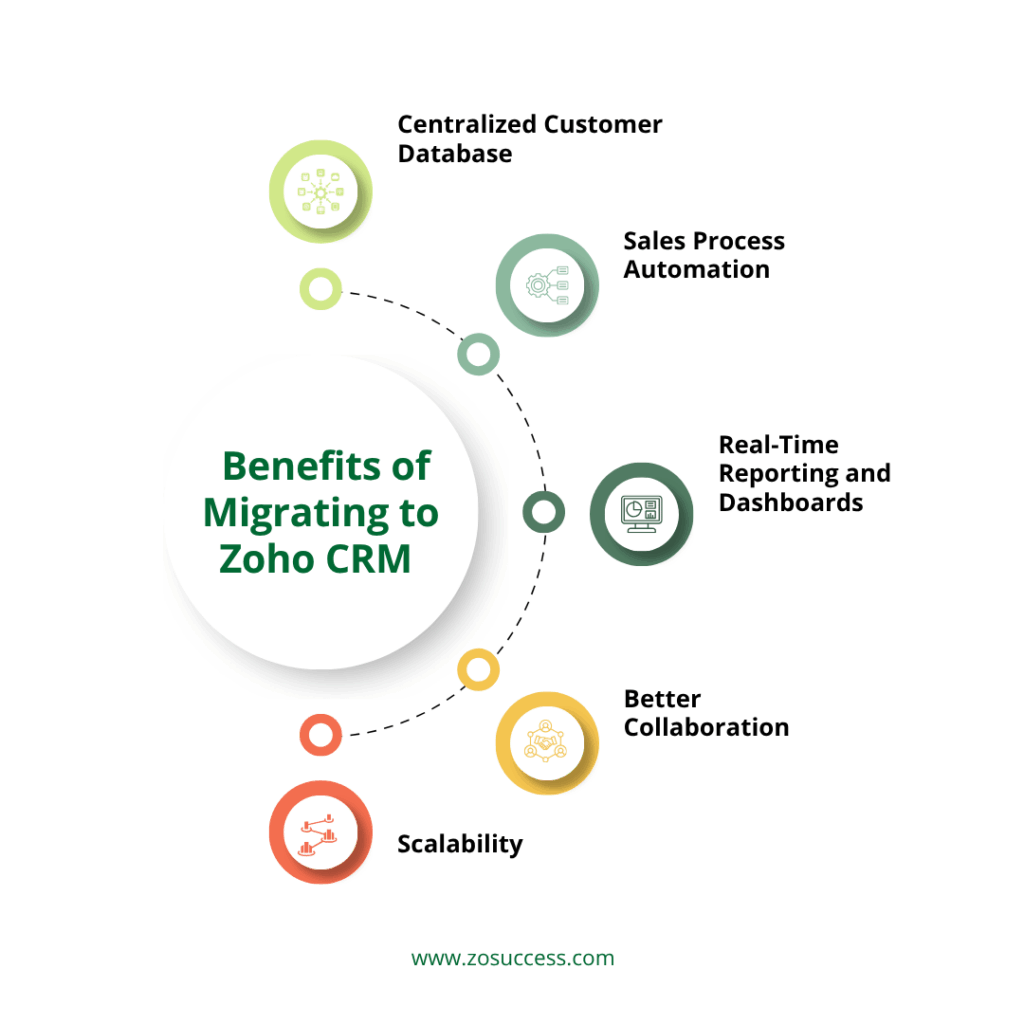
- Centralized Customer Database: Zoho CRM gives your business a single source of truth for leads, contacts, accounts, and deals, replacing scattered spreadsheets and disconnected systems with one place everyone can trust.
- Sales Process Automation: Zoho CRM automates lead assignment, follow-up reminders, approval workflows, and everyday task automation, so reps spend less time on administrative work and more time actually selling.
- Real-Time Reporting and Dashboards: With live dashboards for pipeline visibility, sales forecasting, and performance tracking, leadership no longer has to wait for someone to compile numbers manually before making a decision.
- Better Collaboration: Sales, marketing, and customer support all work from the same customer data, which means fewer miscommunications and a more consistent experience for every customer, regardless of which team they interact with.
- Scalability: Zoho CRM supports growing teams, multiple locations, and expanding business operations, so the platform can grow alongside the business rather than becoming another system to outgrow in a few years.
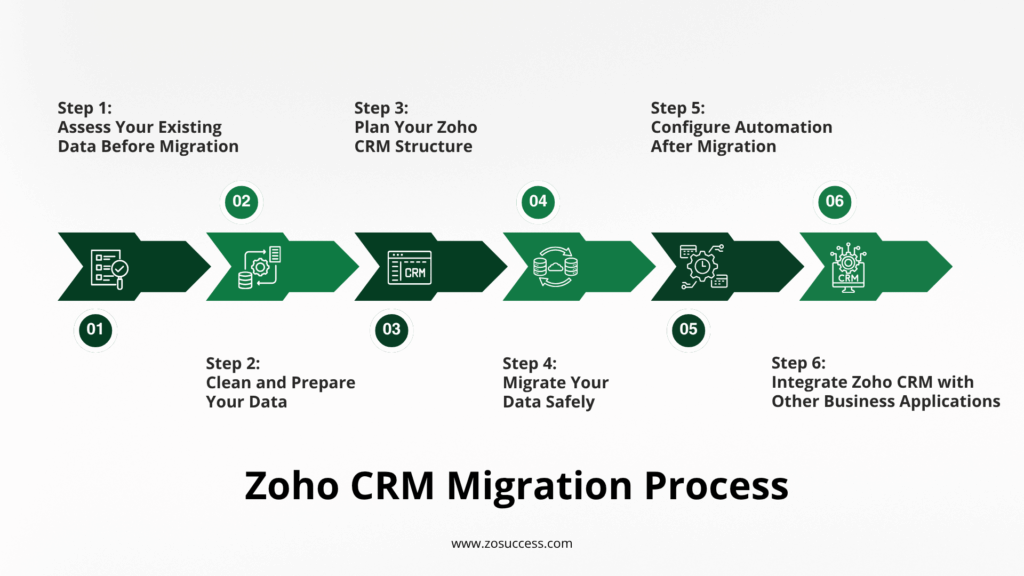
Zoho CRM Migration Process: A Step-by-Step Guide to Moving Your Data Successfully
Step 1: Assess Your Existing Data Before Migration
Every successful migration starts long before any data is actually moved. Taking the time to properly assess what you have and what you actually need reduces the risk of surprises later in the project.
Identify Data Sources
Before migrating anything, map out every place customer data currently lives, including:
- Excel spreadsheets
- Legacy CRM
- Google Sheets
- Contact databases
- Email lists
- ERP or accounting software
Evaluate Data Quality
Review each data source for duplicate records, missing information, inconsistent formatting, and outdated customer records since these issues are far easier to fix before migration than after.
Define What Should Be Migrated
Decide exactly which records and fields need to move into Zoho CRM, including:
- Leads
- Contacts
- Accounts
- Opportunities
- Activities
- Notes
- Attachments
- Products
- Custom fields
Step 2: Clean and Prepare Your Data
- Remove Duplicate Records: Merge duplicate contacts and companies, and standardize customer names so the same person or account is not represented three different ways across your data.
- Validate Data Accuracy: Verify phone numbers, check email addresses, and update inactive records before migration rather than carrying inaccurate contact details into your new CRM.
- Standardize Data Formats: Align date formats, phone numbers, country and state names, and currency formats across every data source, so records behave consistently once they are inside Zoho CRM.
- Archive Unnecessary Data: Remove obsolete records and keep only relevant historical information, so your new CRM starts clean instead of carrying years of clutter forward.
Step 3: Plan Your Zoho CRM Structure
- Configure Core Modules: Set up the core modules your teams will work in daily, including leads, contacts, accounts, deals, tasks, and products, structured to match how your business actually sells.
- Create Custom Fields: Add custom fields for industry-specific information, customer categories, and other business-specific requirements that standard fields do not capture.
- Define User Roles and Permissions: Establish clear access levels for sales representatives, sales managers, marketing teams, customer support, and management, so every user sees exactly what they need and nothing they shouldn’t.
- Design Sales Pipeline Stages: Map your existing sales process to Zoho CRM’s pipeline stages rather than forcing your team to adapt to a generic, out-of-the-box structure that does not reflect how you actually close deals.
Step 4: Migrate Your Data Safely
- Import Data into Zoho CRM: Use the Zoho CRM Import Wizard to bring data in, mapping fields correctly, and validating records before running the final import, rather than importing everything blind and fixing problems afterward.
- Migrate Related Records: Make sure relationships carry over correctly, including contacts linked to accounts, deals linked to contacts, and activities linked to opportunities, so context is not lost in the move.
- Transfer Attachments and Notes: Ensure important documents and communication history are preserved during migration, since this historical context is often what sales and support rely on most when engaging a customer.
- Verify Data Accuracy: Run sample checks after migration, comparing a set of records against the original source data to confirm nothing was lost or altered in the process.
Step 5: Configure Automation After Migration
- Workflow Rules: Set up workflow rules for lead assignment, email notifications, and follow-up reminders so leads are routed and nurtured automatically instead of relying on someone to remember.
- Blueprint: Use Zoho’s Blueprint feature to standardize sales processes and approvals, ensuring every deal follows the same defined steps regardless of which rep is working it.
- Approval Workflows: Automate approvals for discounts, quotes, or contracts, removing bottlenecks where deals used to sit waiting for a manager to notice an email.
- Sales Automation: Layering in broader sales automation reduces manual tasks and improves consistency across the team, freeing reps to spend more time actually selling.
Step 6: Integrate Zoho CRM with Other Business Applications
Zoho CRM becomes significantly more powerful once it is connected to the other tools your business runs on. Common integrations include:
- Zoho Books
- Zoho Desk
- Zoho Campaigns
- Zoho Inventory
- Zoho Projects
- Outlook / Gmail
- WhatsApp Business
- Telephony solutions
These integrations create a connected business ecosystem where finance, support, marketing, and sales all draw from the same customer data, eliminating the disconnected tools and manual re-entry that made the old system frustrating in the first place. For sales teams in India, in particular, the WhatsApp Business integration is often one of the most immediately useful, since it lets reps log and track conversations happening on the channel customers already prefer, directly against the CRM record.
A quote created in Zoho CRM can flow straight into Zoho Books for invoicing, a support ticket in Zoho Desk can show the full sales history behind it, and a marketing campaign in Zoho Campaigns can target the exact segment sales cares about most, all without anyone exporting a single spreadsheet.
Common Migration Challenges and How to Avoid Them
The table below summarizes the most common issues businesses run into during a CRM migration, along with the business impact of each and the best practice to avoid it.
| Challenge | Impact | Best Practice |
|---|---|---|
| Duplicate records | Poor reporting | Clean data before migration |
| Incorrect field mapping | Missing information | Test imports before final migration |
| Data inconsistency | User confusion | Standardize formats |
| Downtime during migration | Business disruption | Plan migration during off-hours |
| Poor user adoption | Low CRM ROI | Train users before go-live |
| Missing historical records | Incomplete customer history | Validate all migrated data |
Best Practices for a Successful Zoho CRM Migration
- Create a Migration Checklist: Plan every phase before execution, so the migration follows a defined sequence instead of being figured out on the fly.
- Perform a Test Migration: Validate mappings and workflows using a small data sample before committing to a full migration, catching issues while they are still easy to fix.
- Back Up Existing Data: Maintain a secure backup of your existing data before migration begins, so there is always a fallback if something goes wrong.
- Train End Users: Ensure teams understand the new CRM before go-live, rather than expecting them to figure it out on their own once the migration is complete.
- Monitor After Go-Live: Review reports, workflows, and user feedback during the first few weeks after go-live, so small issues can be corrected before they become habits.
- Work with a Certified Zoho Partner: Professional guidance minimizes risk and accelerates adoption, particularly for businesses migrating large or complex datasets.
Why Zoho CRM Is Worth the Move
Beyond solving the immediate problems of Excel or a legacy CRM, Zoho CRM brings a set of capabilities that continue to pay off well after go-live, including:
- Cloud-based accessibility from anywhere
- Mobile CRM for teams on the go
- Workflow automation across sales and support
- Zia, Zoho’s AI-powered sales assistant
- Real-time dashboards
- Advanced reporting
- Native integration across the wider Zoho ecosystem
- Per-user pricing that scales with your team as headcount grows
How ZoSuccess Simplifies CRM Migration
ZoSuccess is a trusted Zoho implementation and CRM migration partner, built specifically to help businesses move off Excel and legacy CRM systems without the risk of losing data or momentum along the way. We have worked with businesses across a range of industries, each with its own data quirks, legacy processes, and adoption challenges, which is exactly the kind of experience that makes a migration project go smoothly rather than becoming a drawn-out headache.
Our CRM Migration Services Include
- CRM readiness assessment
- Data audit and cleansing
- Excel and legacy CRM migration
- Custom CRM configuration
- Workflow automation
- Integration with Zoho applications
- User training and adoption
- Ongoing optimization and support
Why Choose ZoSuccess?
Our team brings certified Zoho consultants, a proven migration methodology, and a track record of minimal business disruption during the migration process. We prioritize secure and accurate data migration, and we tailor CRM solutions to fit the specific needs of your industry rather than applying a one-size-fits-all template.
Conclusion
Migrating from Excel or a legacy CRM to Zoho CRM is more than a technology upgrade. It is a strategic investment in how your business manages customer relationships, forecasts revenue, and scales over time. By planning the migration carefully, cleansing your data, configuring the CRM correctly, and training your users, you can ensure a smooth transition without losing valuable customer information along the way.
With the right implementation partner, businesses can reduce migration risks, improve user adoption, and start realizing the benefits of a modern CRM much faster than attempting the move alone. The businesses that see the fastest return are typically the ones that treat migration as a process, not a single event, and continue refining their Zoho CRM setup well after the initial go-live.
Frequently Asked Questions (FAQs)
How long does a typical Excel to Zoho CRM migration take?
Timelines depend on data volume and complexity, but a straightforward migration from Excel or a smaller legacy CRM can often be completed in a few weeks, while larger datasets with multiple integrations may take longer to plan, test, and validate properly.
Will we lose any historical data during the migration?
No, as long as the migration is planned properly. Historical activities, notes, and communication history can all be preserved and mapped into Zoho CRM, so your teams retain full context on every customer relationship.
Can we migrate directly from Excel without an intermediate CRM?
Yes. Zoho CRM’s Import Wizard is designed to accept data directly from spreadsheets, making it entirely possible to move straight from Excel to Zoho CRM without needing an intermediate system.
What happens to our current workflows and approval processes?
Existing sales processes and approval steps can be rebuilt in Zoho CRM using workflow rules, Blueprint, and approval automation, so the way your team already works is reflected in the new system rather than replaced with a generic default.
Do we need to migrate everything at once?
Not necessarily. Many businesses choose a phased migration, starting with core modules like contacts, accounts, and deals before layering in additional data and integrations, which reduces risk and makes the transition easier to manage.
How do we make sure our team actually uses the new CRM?
User adoption comes down to training, clear communication about what is changing and why, and involving key users early in the process. A CRM that fits how your team already sells will always see faster adoption than one that forces an unfamiliar process on them.
Start Your Zoho CRM Migration
Planning to migrate from Excel or your existing CRM to Zoho CRM?ZoSuccess helps businesses migrate data securely, configure Zoho CRM to match their processes, and ensure a smooth transition with minimal disruption. Contact our Zoho CRM experts today and take the first step toward a smarter, more efficient customer relationship management system.

 “ZOSuccess” is the Zoho Consulting Practice of Dhruvsoft Services Private Limited – a leading Zoho Advanced Partner from India – providing services worldwide …