
The service landscape has undergone a massive transformation. Today’s customers expect instant responses, personalized interactions, and consistent service across every channel they use. Whether they reach out on WhatsApp, email, chat, a mobile app, or a support portal, they expect that the company already knows their history, understands their needs, and can resolve their issue without delays.
Because of this shift, the role of the Chief Service Officer (CSO) has evolved from a traditional support leader to a strategic business and technology decision-maker. CSOs must ensure their organizations deliver service that is fast, efficient, scalable, and deeply connected with customer expectations. And to achieve this, one thing has become essential:
A unified, intelligent, and scalable CRM platform.
CRM systems are no longer just “sales tools.” For modern enterprises, they are the backbone of customer experience. They store customer information, automate service workflows, connect every communication channel, and ensure seamless collaboration between service, sales, marketing, operations, and finance.
Having supported thousands of service-driven organizations, Zoho has proven how the right CRM can reshape operations. As an implementation partner, we work closely with CSOs to design CRM ecosystems that align with business outcomes, customer expectations, and long-term growth—not just technology checklists.
This blog will provide an in-depth exploration of:
- Why CRM selection is now mission-critical for CSOs
- How CSOs can align CRM functionalities with organizational service goals
- What service-centric evaluation criteria leaders should use
- The core capabilities in Zoho CRM and its service ecosystem
- Common CRM selection mistakes to avoid
- How Dhruvsoft / ZOSuccess supports CSOs in designing and implementing the right CRM
Let’s dive deeper into this new era of strategic service leadership.
Why CRM Selection Matters for Today’s Chief Service Officers
CSOs are responsible not just for customer support, but for the entire customer experience after the sale. This includes onboarding, issue resolution, retention, renewals, escalations, customer health management, and long-term relationship building.
A CRM directly influences:
1. First Response Time (FRT)
Customers expect brands to acknowledge their queries quickly. A CRM helps automate ticket creation, assign issues to the right team, and notify managers about delays.
2. SLA Compliance
Missing SLAs impacts brand reputation and customer trust. A CRM ensures automated response timers, escalations, reminders, and workload balancing.
3. Customer Retention
Customers stay with companies that solve their problems without friction. A CRM helps identify at-risk accounts and improve service efficiency.
4. Agent Productivity
Service teams often juggle multiple tools. A unified CRM reduces context switching and gives agents the information they need instantly.
5. Customer Experience
A CRM builds consistency—a customer doesn’t have to repeat their story at every interaction. Every agent sees the full history and context.
6. Service-to-Sales Alignment
Expanding accounts and renewals happen when service teams notify sales at the right moment. CRM enables this handoff. By identifying upsell opportunities during a service interaction, the CSO moves the department from a ‘cost center’ to a ‘revenue generator.
This is why CSOs must select a CRM system that supports the entire lifecycle—not just ticket resolution. And in this context, Zoho CRM, paired with Zoho Desk and the broader Zoho ecosystem, becomes the ideal solution—designed for service excellence and built for scalability. Supported by implementation experts like Dhruvsoft / ZOSuccess, CSOs can ensure their CRM is configured exactly to their service vision.
CSOs’ Strategic Role in CRM Selection
Choosing a CRM is not a software purchase—it is an organizational change initiative.
The CSO must evaluate the CRM from several strategic angles:
- Customer expectations
- Business goals
- Team capabilities
- Growth plans
- Integration requirements
- Compliance needs
- Operational scalability
Below is a detailed breakdown of how CSOs can lead CRM selection effectively.
Defining Service-Centric Business Goals
Every service strategy begins with a simple question:
“What kind of service experience should our customers have?”
Some organizations prioritise speed, others value personalization, and others require strong self-service options.
Typical service goals include:
- Faster resolution
- Predictive customer support
- Personalized interactions
- Reduction in escalations
- Better self-service adoption
- Efficient field service operations
- Stronger agent productivity
- Improved service quality
To support these goals, CRM capabilities must align with core KPIs such as:
- CSAT
- NPS
- Ticket backlog
- Resolution time
- First Contact Resolution (FCR)
- Agent utilization
Zoho CRM, especially when combined with Zoho Desk and Zoho Analytics, enables CSOs to directly tie CRM functionality to service KPIs.
ZoSuccess plays a key role by mapping your service workflows to CRM features so the system supports your goals from day one.
Identifying Technology Needs Across the Entire Service Ecosystem
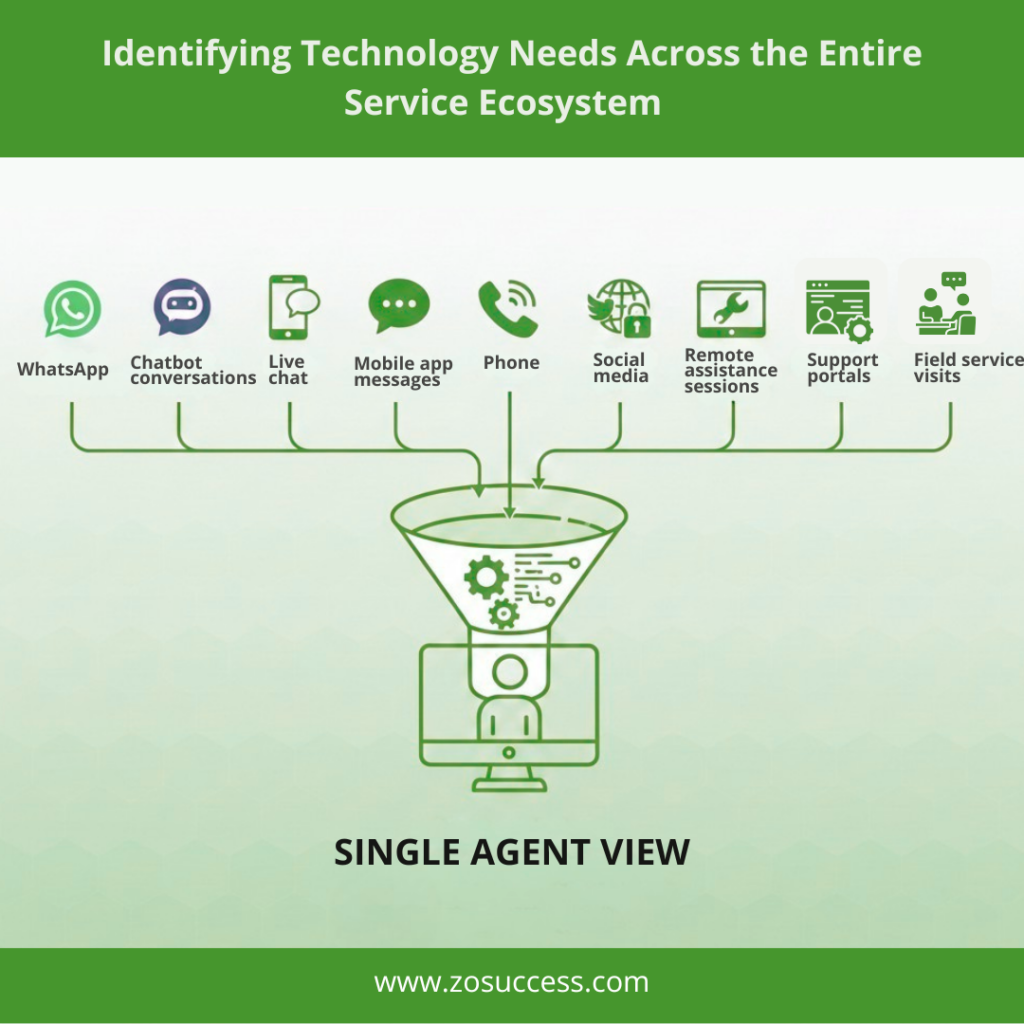
Service operations are no longer limited to email or phone.
Modern customer service spans:
- Chatbot conversations
- Live chat
- Mobile app messages
- Phone
- Mobile app messages
- Social media
- Support portals
- Remote assistance sessions
- Field service visits
A CSO must evaluate whether the CRM can:
- Consolidate communication channels
- Capture every interaction automatically
- Help agents respond faster
- Support escalation management
- Identify customer emotions and sentiment
Zoho CRM + Zoho Desk + Zoho SalesIQ deliver complete omnichannel service visibility. Meanwhile, ZoSuccess experts ensure all channels are configured correctly and mapped to your specific business rules.
Mapping Service Processes to CRM Features
CSOs must convert their service workflows into CRM-based processes.
This includes:
- Ticket creation logic
- Routing rules
- Escalation matrices
- SLA structures
- Approval hierarchies
- Automated responses
- Service blueprint automations
- Field service processes
- Cross-team collaboration
- Customer feedback loops
- Churn signals
- Knowledge base workflows
Zoho CRM’s Blueprint automation tool ensures consistent processes across teams and prevents manual errors. The ZoSuccess team specialises in designing these workflows so that your CRM reflects actual daily operations.
Key CRM Capabilities CSOs Should Prioritize
Zoho’s CRM suite is built around practical service needs. Below are the core capabilities that every CSO should evaluate.
1. Unified Customer View
One of the biggest challenges service teams face is scattered data.
Zoho solves this with a unified, connected record that shows:
- Customer details
- All conversations
- Purchase and product history
- Open tickets
- Past issues
- Service SLAs
- Agent notes
- Emails
- Chat transcripts
- Phone call logs
- Field service logs
- Payment status (via Zoho Books/Finance)
- Customer health scores
This gives service teams complete context.
Dhruvsoft / ZoSuccess team configures these modules so every department shares a single source of truth.
2. Omnichannel Interactions
Zoho CRM and Zoho Desk combine to provide:
- Email ticketing
- WhatsApp integration
- Zendesk-like live chat (via SalesIQ)
- Phone integration
- SMS channels
- Social media monitoring
- Customer portal
- Instant ticket creation from chatbots
- Ticket updates via mobile app
Agents never switch tools—everything appears inside Zoho CRM or Zoho Desk.
3. Intelligent Automation
Zoho offers one of the most flexible automation engines in the modern CRM market.
This includes:
- Workflow rules
- Auto-assign actions
- Escalation logic
- SLA timers
- Blueprint process mapping
- Ticket prioritisation
- Response suggestions
- Automated customer surveys
- Smart follow-ups
- Real-time alerts
And with Zia AI, service teams gain:
- Sentiment analytics
- Issue prediction
- Intelligent ticket classification
- Automated knowledge base suggestions
- Root-cause trend detection
- Churn probability scoring
Automation + AI reduces manual work and drives consistent service performance.
4. Case & Ticket Management
Zoho Desk is deeply integrated with Zoho CRM.
Capabilities include:
- Multi-channel ticket creation
- Custom queues
- Round-robin / skills-based assignment
- Collision detection
- SLA-based workflows
- Ticket tagging
- Multi-level escalation paths
- Ticket lifecycle tracking
- Customer history syncing with CRM
- “Service-to-Sales” lead generation triggers
This ensures no customer request is lost, delayed, or mismanaged.
5. Real-Time Service Analytics
With Zoho Analytics, service leaders gain enterprise-grade reporting:
- Ticket volume trends
- SLA achievement analysis
- Support channel breakdown
- Agent performance scorecards
- Customer lifetime value
- Feedback trends
- Service bottleneck detection
- Field service performance
- Workload distribution
- Predictive customer churn
- AI-driven anomaly alerts
CSOs can make quick decisions based on accurate, unified data.
6. Integrations & Scalability
Zoho CRM integrates with:
- ERP systems like SAP, Oracle, NetSuite
- CPQ tools
- HR systems
- Finance tools (like Zoho Books)
- Custom legacy applications
- Mobile apps
- Field service management tools
ZoSuccess specialises in designing these integrations to ensure seamless enterprise workflows.
Aligning CRM Selection With Business Goals — A CSO Framework
Zoho recommends a structured decision-making model for CSOs:
1. Map Customer Journeys
Identify every customer touchpoint and interaction point:
- Lead management
- Onboarding
- Product training
- Issue detection
- Support requests
- Escalations
- Renewals
- Upsell opportunities
Zoho CRM + Desk helps you track and optimize every stage.
2. Focus on Outcomes, Not Features
Instead of checking feature lists, CSOs should evaluate:
- Will this CRM reduce resolution time?
- Will it lower the ticket backlog?
- Can it improve customer retention?
- Does it simplify agent workflows?
- Will it help management track KPIs easily?
- Does it support long-term customer insights?
Zoho focuses on practical outcomes, not bells and whistles.
3. Evaluate Change Management Requirements
Effective CRM adoption requires:
- Strong onboarding
- Proper documentation
- Role-based dashboards
- Team training
- Clear process definitions
- Internal champions
Dhruvsoft provides end-to-end change management so your teams adopt CRM smoothly.
4. Assess ROI & Scalability
CSOs must consider:
- Licensing costs
- Implementation timeline
- Customization flexibility
- Long-term maintenance simplicity
- Integration needs
- Expansion roadmap
Zoho offers remarkable ROI with lower TCO compared to Salesforce, HubSpot, or ServiceNow—making it a CSO-friendly long-term choice.
| Priority | Traditional Legacy CRM | Zoho Ecosystem (via ZOSuccess) |
|---|---|---|
| Data Flow | Siloed / Fragmented | Unified 360° View |
| Automation | Manual / Rule-based | AI-driven (Zia) / Predictive |
| Channel Support | Disconnected add-ons | Native Omnichannel Integration |
| Total Cost | High (Heavy Licensing / IT) | Optimized ROI / Lower TCO |
Common CRM Selection Mistakes CSOs Should Avoid
Here are the most frequent mistakes we see:
- Choosing a CRM without involving service teams
- Over-customizing the system
- Ignoring integration requirements
- Selecting tools designed only for sales
- Underestimating AI and analytics
- Choosing platforms that require heavy IT dependency
- Focusing only on current needs, not future scalability
Zoho CRM helps CSOs avoid these pitfalls through its flexible, integrated, and future-ready design.
Why Zoho CRM Is the Ideal Choice for CSOs
Zoho is built specifically for customer-centric organizations.
- Unified ecosystem for sales + service + marketing
- AI-driven automation via Zia
- Seamless integration with Zoho Desk & Assist
- Advanced analytics to monitor service KPIs
- Flexible customization without complexity
- Lower cost and faster deployment
- Enterprise-grade security
- Continually updated with new innovations
And with ZoSuccess, CSOs get the expertise needed to deploy Zoho CRM the right way.
How ZoSuccess Helps CSOs Implement Zoho CRM Successfully
ZoSuccess is among the most trusted Zoho Partners for service-driven organizations.
Our Core Services Include:
- Detailed CRM requirement study
- Customer journey mapping
- Zoho CRM + Zoho Desk implementation
- Blueprint & workflow automation
- SLA management configuration
- Integration with ERP/Finance/Operations
- Dashboard creation for CSOs
- AI & predictive analytics setup
- User training and onboarding
- Ongoing support and optimization
What CSOs Gain with ZOSuccess:
- Faster implementation
- Industry-specific CRM configurations
- Improved agent productivity
- Better KPI performance
- Seamless sales-to-service collaboration
- Higher customer satisfaction and retention
- Future-ready CRM foundation
Conclusion
The modern Chief Service Officer plays a crucial role in shaping customer experience—and selecting the right CRM is one of their most strategic decisions.
Zoho CRM, combined with Zoho Desk, Zoho Analytics, Zoho Assist, and Zia AI, gives CSOs everything they need to create a connected, efficient, intelligent, and scalable service ecosystem.
With the expert guidance of Dhruvsoft, organizations can design CRM systems that align directly with service goals, KPIs, business strategy, and long-term growth.
Looking to implement Zoho CRM for your service organization? ZoSuccess — as a trusted Zoho Partner — helps CSOs build customer-first CRM strategies. Contact us today to start your CRM transformation journey.


 “ZOSuccess” is the Zoho Consulting Practice of Dhruvsoft Services Private Limited – a leading Zoho Advanced Partner from India – providing services worldwide …