
In many organizations, implementing a CRM system is seen as the final goal of a digital transformation project. Leadership teams often invest significant time and resources into selecting the right CRM platform, configuring workflows, migrating data, and training employees.
However, experienced operations leaders understand an important reality: CRM implementation is only the beginning of the transformation journey.
The real business value of CRM appears after the system goes live, when organizations begin refining processes, automating repetitive work, analysing operational data, and improving collaboration across teams.
For Chief Operating Officers (COOs) and operations leaders, Zoho CRM offers far more than a tool for managing sales pipelines. When used strategically, it becomes a central operational intelligence platform that connects sales, customer service, marketing, and internal business operations.
By combining Zoho CRM with other applications in the Zoho ecosystem — such as Zoho Analytics, Zoho Desk, Zoho Projects, and Zoho Flow — organizations can create a connected operational environment that improves efficiency, visibility, and decision-making.
In this comprehensive guide, we will explore:
- The operational role of Zoho CRM after implementation
- Common operational challenges organizations face after CRM deployment
- Strategies COOs can use to optimize business processes
- How Zoho CRM automation improves productivity
- How the Zoho ecosystem supports operational intelligence
- Best practices for continuous operational improvement
- How organizations can scale operations using Zoho CRM
This guide is designed to help operations leaders transform Zoho CRM from a simple customer management tool into a powerful engine for operational efficiency.
Understanding the COO’s Role in Technology-Driven Operations
In modern organizations, the role of the COO has evolved significantly. Traditionally, COOs focused on managing day-to-day business operations, ensuring departments worked efficiently and processes ran smoothly.
Today, the COO also plays a major role in driving digital transformation and operational innovation.
Technology investments such as CRM, ERP, analytics platforms, and automation tools must produce measurable improvements in operational performance. This responsibility often falls directly under the COO.
Key responsibilities of operations leaders include:
- Streamlining Organizational Processes: Operations leaders must identify inefficiencies across departments and create standardised processes that improve productivity and reduce delays.
- Improving Team Productivity: Technology should help employees focus on strategic tasks rather than routine administrative work. Automation, workflow management, and intelligent task assignment all support this objective.
- Increasing Cross-Department Collaboration: Many operational challenges occur because teams operate in silos. Sales, marketing, service, and operations teams often work with disconnected tools and data. The COO must ensure that technology platforms enable seamless collaboration.
- Monitoring Operational Performance: Operations leaders need access to reliable performance metrics. Without clear visibility into operational data, leadership cannot identify bottlenecks or improvement opportunities.
- Supporting Business Scalability: As organizations grow, operational complexity increases. Systems must be flexible enough to support expansion without introducing inefficiencies.Zoho CRM provides several capabilities that support these operational goals.
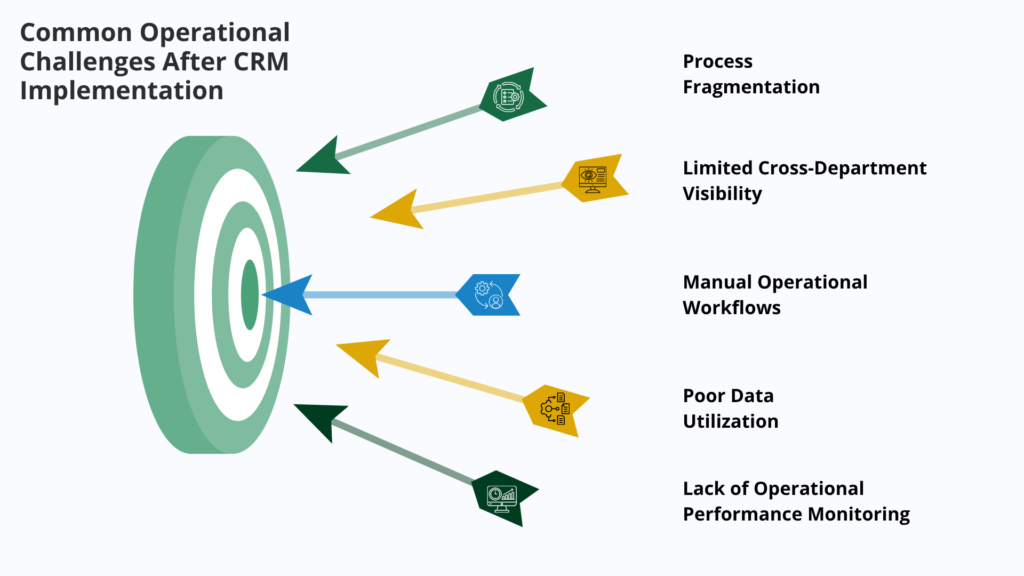
Common Operational Challenges After CRM Implementation
Although CRM systems promise improved efficiency and better data management, many organizations struggle to realize these benefits immediately after implementation.
Several operational challenges often remain.
Process Fragmentation
One of the most common problems is that employees continue using familiar tools such as spreadsheets, personal databases, or third-party applications.
This leads to fragmented processes, where information is stored across multiple systems rather than in the CRM platform.
Consequences include:
- Duplicate data records
- Inconsistent information across departments
- Reduced operational visibility
- Difficulty generating accurate reports
A properly optimised CRM system should become the central system of record for customer-related activities.
Limited Cross-Department Visibility
Another challenge is the lack of transparency between teams.
For example:
- Sales teams may manage deals in the CRM system
- Customer service teams may track support tickets in another platform
- Marketing teams may operate marketing automation tools separately
When systems are disconnected, leadership cannot see the complete customer journey. Zoho CRM can address this problem by integrating multiple departments into a unified platform.
Manual Operational Workflows
Even after implementing CRM systems, many organizations still rely on manual processes for approvals, follow-ups, and task management.
Examples include:
- Manual deal approval processes
- Email reminders for customer follow-ups
- Spreadsheet tracking of operational tasks
- Manual data entry between systems
These activities consume valuable employee time and increase the risk of errors. Automation is essential for improving operational efficiency.
Poor Data Utilization
CRM systems capture large volumes of valuable data, including customer interactions, sales performance, marketing campaigns, and support activities.
However, many organizations fail to convert this data into actionable insights. Without proper dashboards and analytics tools, leadership cannot use CRM data to improve decision-making.
Lack of Operational Performance Monitoring
Operations leaders require visibility into business performance metrics.
Without clear reporting tools, it becomes difficult to identify:
- Process delays
- Customer service issues
- Productivity gaps
- Sales pipeline inefficiencies
Zoho CRM’s reporting and analytics capabilities help address this challenge.
Leveraging Zoho CRM to Optimize Business Operations
Once the CRM system is implemented, COOs should focus on optimising the platform to support operational excellence. Zoho CRM offers several capabilities that help organizations improve efficiency.
Centralizing Operational Data
A major advantage of Zoho CRM is its ability to centralise data across the organization. Instead of storing information in multiple disconnected systems, Zoho CRM consolidates:
- Customer profiles
- Sales opportunities
- Marketing engagement data
- Support tickets
- Internal tasks and activities
For operations leaders, centralised data provides a single source of truth for business performance.
This enables leadership to:
- Monitor operational metrics in real time
- Track customer interactions across departments
- Identify operational bottlenecks quickly
- Improve decision-making accuracy
Centralized data also improves collaboration between teams.
Automating Repetitive Operational Tasks
- Automation is one of the most powerful features of Zoho CRM.
- By reducing manual work, automation improves productivity and reduces operational costs.
- Several automation tools are available within the platform.
Automating and Enforcing Workflow Rules
- Workflow rules allow organizations to automate routine actions based on defined conditions.
- Examples include:
- Automatically assigning leads to sales representatives
- Sending automated follow-up emails after customer interactions
- Updating deal stages based on activities
- Notifying managers when high-value deals are created
- Workflow automation ensures that processes run smoothly without requiring constant manual intervention.
Blueprint Process Automation
- Zoho CRM Blueprint helps organizations enforce structured business processes.
- This feature guides employees through defined workflow stages.
- Examples include:
- Lead qualification workflows
- Deal approval processes
- Customer onboarding steps
- Support escalation procedures
- Blueprint ensures consistency across teams and reduces process variation.
Scheduled Automation
Scheduled automation allows organizations to trigger actions at specific times.
Examples include:
- Daily report generation
- Scheduled follow-ups for inactive leads
- Automatic data updates
This capability reduces administrative overhead.
Automated Alerts and Notifications
Zoho CRM can send alerts and notifications when specific events occur.
Examples include:
- Deal closure notifications
- Escalation alerts for unresolved support tickets
- Notifications when customers respond to communications
This ensures teams respond quickly to important events.
Standardizing Business Processes Across the Organization with Zoho CRM
- Operational efficiency depends on consistency.
- If employees follow different processes for similar tasks, operational performance becomes unpredictable.
- Zoho CRM enables organizations to standardise workflows.
Lead Management Standardization
- Sales teams often follow different methods for qualifying leads.
- Zoho CRM allows organizations to define clear qualification criteria and automate lead assignment.
- This ensures every lead receives consistent evaluation.
Deal Approval Workflows
- Large discounts or high-value deals may require management approval.
- Zoho CRM can automatically trigger approval workflows when specific conditions are met.
- This improves governance and reduces risks.
Customer Onboarding Processes
- Effective Customer onboarding is critical for long-term satisfaction.
- Using Zoho CRM workflows, organizations can automate onboarding tasks such as:
- Welcome communications
- Account setup processes
- Service activation
- Structured onboarding improves the customer experience.
Customer Service Escalation
- Support teams must respond quickly to critical issues.
- Zoho CRM and Zoho Desk can automate ticket escalation based on service-level agreements.
- This ensures timely resolution of customer problems.
Improve Cross-Department Collaboration with Zoho
- Operational success depends on effective collaboration between teams.
- Zoho CRM includes several features designed to improve communication and coordination.
Zoho CRM Feeds
- Zoho CRM Feeds works similarly to social collaboration platforms.
- Employees can:
- Share updates
- Comment on records
- Tag colleagues
- Discuss deals or customer cases
- This keeps conversations connected to CRM data.
Shared Dashboards
- Operations leaders can create dashboards that provide visibility across departments.
- Examples include:
- Sales pipeline performance
- Customer service metrics
- Marketing campaign results
- Shared dashboards ensure that teams align with organizational goals.
Integrated Communication Tools
- Zoho CRM integrates with email systems, telephony platforms, and messaging tools.
- This enables teams to manage communications directly from the CRM system.
- Centralized communication improves transparency.
Leveraging the Zoho Ecosystem for Operational Excellence
One of the greatest strengths of Zoho CRM is its integration with the broader Zoho ecosystem. When connected with complementary applications, the CRM platform becomes a powerful operational hub.
Zoho Desk: Integrated Customer Service Management
Zoho Desk is a customer support platform that integrates seamlessly with Zoho CRM.
Key benefits include:
- Centralized support ticket management
- Visibility into customer service interactions
- Automated service workflows
- Customer satisfaction tracking
Operations leaders can monitor service performance alongside sales data.
Zoho Projects: Managing Operational Initiatives
Zoho Projects helps organizations coordinate tasks, projects, and operational initiatives.
Teams can manage:
- Implementation projects
- Internal process improvement initiatives
- Cross-department activities
Project management tools improve accountability and task visibility.
Zoho Analytics: Advanced Business Intelligence
Zoho Analytics transforms CRM data into powerful visual dashboards.
Operations leaders can analyse:
- Sales performance trends
- Customer behaviour patterns
- Marketing campaign effectiveness
- Service response times
Advanced analytics helps leadership make data-driven decisions.
Zoho Flow: Integrating External Systems
Zoho Flow enables organizations to integrate Zoho CRM with other applications.
Examples include:
- ERP systems
- Marketing platforms
- Finance tools
- Customer portals
Integration eliminates manual data transfer and improves operational efficiency.
Using Analytics for Operational Intelligence
Data is one of the most valuable assets in modern organizations. Zoho CRM analytics tools allow COOs to transform raw data into meaningful insights.
Key Operational Metrics to Track
Operations leaders should monitor several key metrics.
Important examples include:
- Sales cycle length
- Lead conversion rates
- Customer acquisition cost
- Customer lifetime value
- Customer support response time
- Ticket resolution time
- Employee productivity metrics
Tracking these metrics helps organizations identify operational improvements.
Benefits of Real-Time Dashboards
- Identify Operational Bottlenecks: Real-time dashboards help leaders quickly identify delays or inefficiencies in operations. By monitoring key metrics, teams can detect problems early and take corrective action before they affect performance.
- Improve Forecasting Accuracy: With live business data, organizations can make more accurate forecasts. Sales trends, inventory levels, and financial data update automatically, helping teams plan better.
- Enable Faster Decision-Making: Executives and managers can access important insights instantly. This allows executives to respond quickly to market changes and operational challenges.
- Align Teams with Strategic Goals: Dashboards make performance visible to everyone. Teams can clearly see progress against targets and stay aligned with company objectives.
Advanced reporting tools like Zoho Analytics further enhance dashboards with powerful data visualisation, deeper insights, and interactive reports.
Continuous Process Optimization with Zoho CRM
Operational optimization is not a one-time activity. It requires ongoing monitoring and improvement. With Zoho CRM, organizations can continuously refine processes to improve efficiency and performance.
COOs should implement continuous improvement practices such as:
- Regular Workflow Reviews: Review CRM workflows regularly to ensure automation rules are still relevant. Remove unnecessary steps and simplify processes to improve efficiency.
- Data Quality Audits: Maintain clean and accurate CRM data. Regular audits help identify duplicate, incomplete, or outdated records and ensure reliable reporting.
- Performance Benchmarking: Compare key operational metrics across teams, departments, or regions. This helps identify best practices and areas that need improvement.
- User Adoption Monitoring: Track how employees use Zoho CRM. Monitor login activity, record updates, and workflow usage to ensure the system is being used effectively.
- Training and Change Management: Provide ongoing training for teams as new features and processes are introduced. This helps employees stay updated and use Zoho CRM more efficiently.
Scaling Operations with Zoho CRM
As businesses grow, operational complexity increases.
Zoho CRM supports scalable operations through features such as:
- Custom modules
- Advanced workflows
- Multi-region operations
- API integrations
- Third-party system connectivity
This flexibility ensures that CRM systems continue supporting business growth without requiring major technology changes.
How ZoSuccess / Dhruvsoft Helps COOs Optimize Operations with Zoho CRM
Implementing CRM technology is only part of the journey. Organizations often need expert guidance to fully unlock their value.
ZoSuccess helps organizations maximize the potential of Zoho CRM through specialized services.
ZoSuccess Services Include:
- Post-implementation CRM optimization audits
- Business process automation using Zoho CRM Blueprint
- Workflow and integration optimization
- Advanced analytics dashboards using Zoho Analytics
- User training and adoption programs
- Continuous support and performance monitoring
By aligning CRM configuration with operational goals, ZoSuccess helps organizations transform Zoho CRM into a powerful operational intelligence platform.
Conclusion
Zoho CRM implementation represents an important step toward digital transformation. However, the real operational impact comes from continuous optimization, automation, and data-driven decision-making.
For COOs and operations leaders, Zoho CRM provides a platform capable of transforming business operations by:
- Automating repetitive processes
- Standardizing workflows across departments
- Improving cross-team collaboration
- Delivering real-time operational insights
- Supporting scalable business growth
When integrated with Zoho Analytics, Zoho Desk, Zoho Projects, and Zoho Flow, the CRM system becomes a comprehensive operational management platform.
Organizations that invest in post-implementation optimization can achieve greater efficiency, improved customer experiences, and stronger operational performance.
Want to Optimize Your Operations with Zoho CRM?
ZoSuccess (the Zoho Practice of Dhruvsoft – an ERP & CRM Consulting Company) helps COOs and operations leaders design efficient workflows, automate business processes, and unlock the full potential of Zoho CRM.
Contact ZoSuccess experts today to transform your CRM system into a powerful operational intelligence platform.


 “ZOSuccess” is the Zoho Consulting Practice of Dhruvsoft Services Private Limited – a leading Zoho Advanced Partner from India – providing services worldwide …