
In today’s competitive market, having a clear and complete view of your sales process is no longer optional — it’s essential. Businesses are constantly trying to understand their customers better, improve conversion rates, and make data-driven decisions. But to achieve this, they need more than just basic sales tracking. They need a 360-degree view of their sales — a comprehensive, real-time snapshot of every customer interaction, sales opportunity, communication, and deal status. This holistic perspective empowers sales teams to take the right action at the right time and helps leaders make smarter decisions to drive growth.
The Challenge: Scattered Sales Data Across Multiple Systems
One of the biggest barriers to gaining a full sales view is data fragmentation. In many organizations, customer and sales data are spread across various tools — spreadsheets, emails, marketing platforms, ERP systems, customer support platforms, and more. Sales reps often have to jump between different applications just to gather basic information about a lead or customer.
This lack of integration causes:
- Incomplete customer profiles
- Miscommunication between teams
- Delayed responses to prospects
- Lost sales opportunities
- Inconsistent reporting and forecasting
The result? A disjointed sales process that slows down decision-making and hampers the customer experience.
The Solution: How Zoho CRM Unifies and Integrates Sales Data
This is where Zoho CRM stands out. It acts as a central hub that brings all your sales data together in one place. Zoho CRM is designed to break down silos and connect your sales, marketing, support, and inventory systems into a single platform. Through native integrations, APIs, and customizable modules, Zoho CRM helps you build a 360-degree view of each customer and deal, giving your teams full visibility and control.
With Zoho CRM, you can:
- Automatically capture leads from various sources (web forms, emails, social media)
- Track every touchpoint and customer interaction in real time
- Sync data from third-party tools like email, telephony, accounting, and help desk systems
- Access intelligent insights and AI-powered suggestions using Zia (Zoho’s AI assistant)
- Enable collaboration across departments through shared records and notes.
- Track essential metrics and performance reports to guide informed decision-making.
By integrating all your sales-related data into one intuitive system, Zoho CRM turns scattered information into actionable insights. It not only helps your team work more efficiently but also allows leaders to identify trends, optimize processes, and improve customer satisfaction — ultimately leading to higher revenue and better business outcomes.
What is a 360-Degree Sales View?
A 360-degree sales view refers to a comprehensive, real-time snapshot of every aspect of your sales process — from the first touchpoint with a lead to the final sale and ongoing customer relationship. It means having all relevant customer data, sales activities, communication history, and performance metrics in one centralised platform.Instead of relying on disconnected systems and fragmented information, a 360-degree sales view brings everything together. Sales reps can instantly see a lead’s background, communication timeline, previous purchases, open issues, marketing campaign engagement, and more — all from one dashboard.
Why Is a Unified Sales Perspective Important?
In today’s fast-moving business environment, speed, personalization, and accuracy are critical. Sales teams must move quickly and confidently, and that’s only possible when they have complete visibility of the customer journey. A 360-degree sales view enables businesses to understand their customers better, identify opportunities earlier, and provide a more tailored experience throughout the sales cycle.
Key Benefits of a 360-Degree Sales View
Improved Lead Management and Nurturing
With all lead information stored in a single place, sales reps can easily track lead sources, behaviour, and stage in the pipeline. Zoho CRM enables automated lead scoring, segmentation, and follow-ups, helping sales teams prioritise high-quality leads and nurture them with timely, relevant communication. This boosts conversion rates and minimises lead loss.
More Accurate Sales Forecasting
When sales data is scattered, forecasting becomes guesswork. A 360-degree view gives managers access to real-time data on deals, pipelines, and rep performance. Zoho CRM’s built-in analytics and forecasting tools allow you to predict future revenue, track performance trends, and make data-backed business decisions with confidence.
Enhanced Customer Interactions
Knowing your customers’ full history allows your team to provide more personalized, consistent, and meaningful interactions. Whether a customer speaks to sales, support, or marketing, everyone is on the same page. This consistency builds trust and loyalty and makes the customer feel understood and valued.
Data-Driven Decision Making
With all your data unified, business leaders and sales managers can access detailed dashboards and reports to analyse what’s working and what’s not. This makes it easier to optimize campaigns, adjust strategies, and allocate resources effectively. Zoho CRM even uses Zia AI to suggest the best times to reach out to leads, identify patterns in customer behaviour, and highlight potential risks — enabling smarter decisions every step of the way.
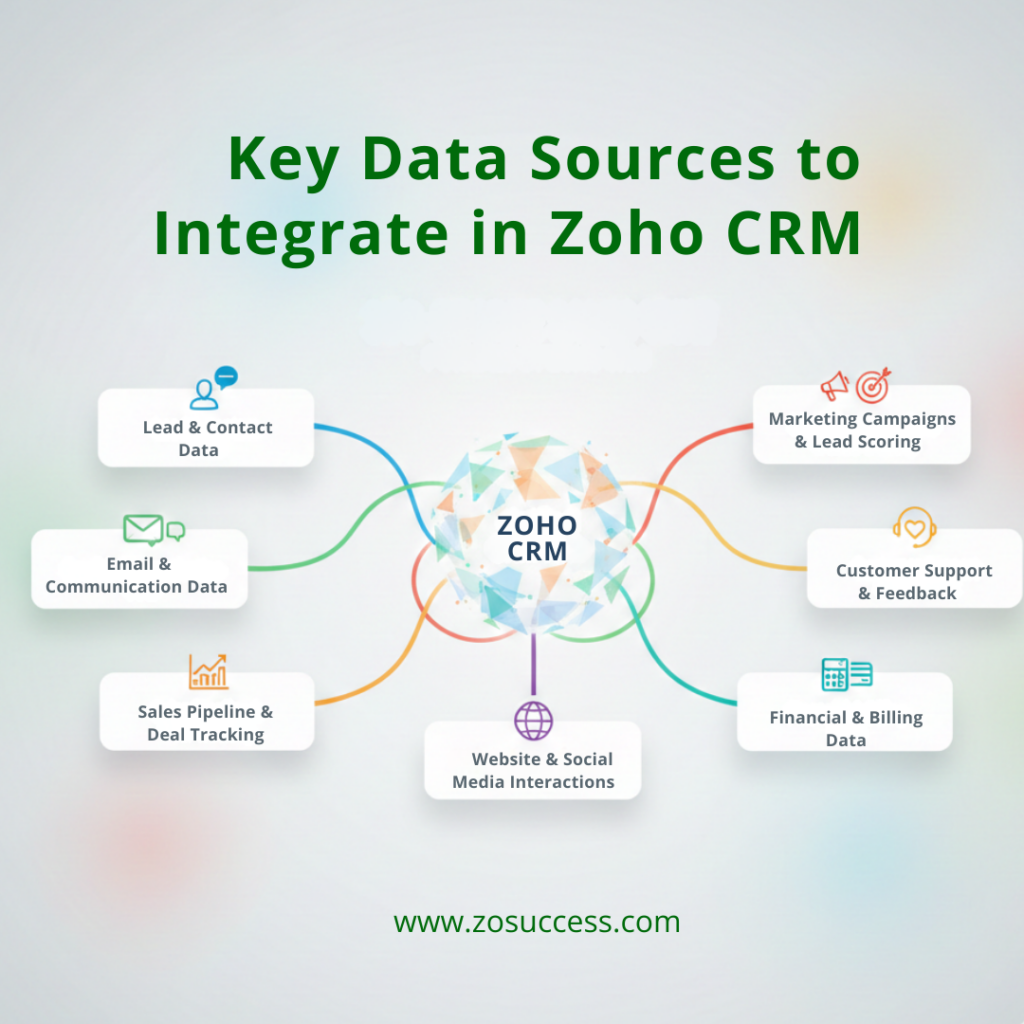
Key Data Sources to Integrate in Zoho CRM
To build a true 360-degree sales view, it’s important to connect all critical data sources to your CRM. Zoho CRM makes it easy to integrate with various platforms and tools so your sales team always has access to complete, real-time information. Here are the key data sources you should consider integrating into Zoho CRM:
Lead & Contact Data
Your CRM should begin with accurate and complete information about your leads and customers.Zoho CRM enables you to automatically collect lead and contact information from multiple sources.
- Website contact forms
- Landing pages
- Social media inquiries
- Third-party lead generation platforms
This ensures your database is always up to date and helps your sales team respond quickly and effectively.
Email & Communication Data
Communication is a critical part of the sales cycle. By syncing Zoho CRM with tools like Zoho Mail, Outlook, and Gmail, you can:
- Track email conversations directly within CRM records
- Get notifications when an email is opened or clicked
- Send follow-ups without switching between apps
This integration helps your team stay organized and maintain a consistent tone with prospects.
Sales Pipeline & Deal Tracking
Zoho CRM gives you full control over your sales pipeline, allowing you to monitor each stage of the sales journey:
- Track open deals, deal stages, and expected closing dates
- Monitor deal conversions and reasons for lost opportunities
- Forecast revenue based on pipeline data
These insights help you identify bottlenecks and optimize the sales process.
Marketing Campaigns & Lead Scoring
When integrated with Zoho Campaigns, Zoho Marketing Automation, or third-party tools, your CRM can do the following:
- Track email marketing campaign performance
- Score leads based on engagement and behaviour
- Align marketing efforts with sales goals
This connection ensures that marketing-qualified leads (MQLs) are automatically shared with the sales team, improving conversion rates.
Customer Support & Feedback
Zoho CRM integrates seamlessly with Zoho Desk, giving sales teams visibility into:
- Open and closed support tickets
- Customer satisfaction ratings
- Feedback from support interactions
With this data, your sales reps can better understand customer concerns and follow up more effectively, improving the overall customer experience.
Financial & Billing Data
Integrating Zoho Books or other accounting tools with Zoho CRM enables you to:
- View customer invoices, payments, and outstanding balances
- Track billing cycles and due dates
- Get a full financial view of each client within the CRM
This helps align the finance and sales departments and ensures reps are aware of important financial details during negotiations.
Website & Social Media Interactions
With integrations like Zoho Social, Zoho PageSense, or Google Analytics, you can:
- Track how leads interact with your website and social media pages
- See which campaigns or content generate the most interest
- Use web behaviour to personalise your sales outreach
This allows your team to better understand what drives engagement and tailor their messaging accordingly.By integrating all these data sources, Zoho CRM becomes a single source of truth for your sales team. It eliminates data silos, improves collaboration between departments, and gives you powerful insights to drive smarter, faster decisions.
How to Integrate Various Data Sources into Zoho CRM
Integrating your business tools and platforms with Zoho CRM helps you eliminate silos and build a centralised system for your sales operations. Zoho offers a variety of ways to connect different data sources — whether you use Zoho apps, third-party tools, or custom APIs.
Here’s a breakdown of how you can integrate multiple data sources into Zoho CRM and create a seamless sales ecosystem.
Using Zoho’s Native Integrations
One of the biggest advantages of Zoho CRM is its smooth integration with other Zoho apps. This makes it easy to create an all-in-one business environment.
Connect Zoho CRM with:
- Zoho Desk – Get support ticket insights directly inside the CRM to better understand customer issues and satisfaction levels.
- Zoho Books – Access invoice and payment details to stay on top of client finances during sales discussions.
- Zoho Marketing Automation – Track email engagement and form submissions and automate lead nurturing.
- Zoho Social – Monitor and engage with prospects on social platforms directly from your CRM.
With all Zoho apps connected, you get a unified view of every customer — across marketing, sales, finance, and support.
Why Use Zoho One for Full Business Integration?
Zoho One is a powerful all-in-one platform that gives you access to over 40 Zoho apps, including CRM, Books, Desk, Campaigns, Inventory, and more — all under a single login and billing system.
Benefits of Zoho One:
- Centralized data management across departments
- Consistent UI and user experience
- Cost-effective pricing for small and medium businesses
- Simplified collaboration and reporting across tools
Using Zoho One helps businesses eliminate the need for multiple vendors and platforms, making your sales operations more connected, efficient, and scalable.
Zoho CRM Integrations with Third party Apps
Even if you’re using tools outside of the Zoho ecosystem, you can still connect them easily through the Zoho Marketplace, which offers hundreds of ready-to-use integrations.
Popular third-party integrations include:
- Google Workspace & Microsoft 365 – Sync emails, calendars, contacts, and documents for better communication tracking.
- QuickBooks & Xero – Share financial and billing data with your sales team to streamline quoting and payment conversations.
- Shopify & WooCommerce – Sync customer and order data to understand buying behaviour and manage post-purchase communication.
These integrations help ensure your team can work within Zoho CRM without constantly switching between platforms.
Using APIs & Custom Integrations
For more advanced setups, Zoho CRM offers a powerful API that developers can use to create custom connections with virtually any system.
Benefits of using Zoho CRM APIs:
- Customize data flow between your ERP, website, or proprietary tools
- Automate tasks like updating records, sending notifications, or importing leads
- Ensure real-time data accuracy and syncing
You can also use Zoho Creator to build custom apps that connect with your CRM and tailor the experience for your specific business processes.
experience for your specific business processes.
Role of Zoho Flow: Automate Workflows Across Apps
Zoho Flow is Zoho’s integration automation platform — similar to Zapier — that helps you create automated workflows between your apps.
For example, you can:
- Auto-create a CRM contact when a new lead fills out a Typeform
- Send a Slack notification when a deal is closed in Zoho CRM
- Add a row in Google Sheets when a new invoice is created in Zoho Books
Zoho Flow reduces manual work and ensures your apps talk to each other seamlessly.
Automating Data Sync & Updates in Zoho CRM
Once your tools are connected, Zoho CRM allows you to automate daily sales processes using Workflows and Blueprints.
Examples of automation:
- Auto-assign leads based on territory or product interest
- Send follow-up emails after form submissions or meetings
- Update deal status based on email engagement or task completion
These automations not only save time but also reduce errors and ensure timely actions.
Using Zoho Analytics for Real-Time Sales Insights
To make the most of your integrated data, connect Zoho Analytics with Zoho CRM to get:
- Real-time dashboards and performance metrics
- Custom reports on sales pipeline, conversion rates, and team productivity
- Forecasting and trend analysis using historical CRM data
With Zoho Analytics, you turn raw data into meaningful insights that help improve strategy and decision-making.
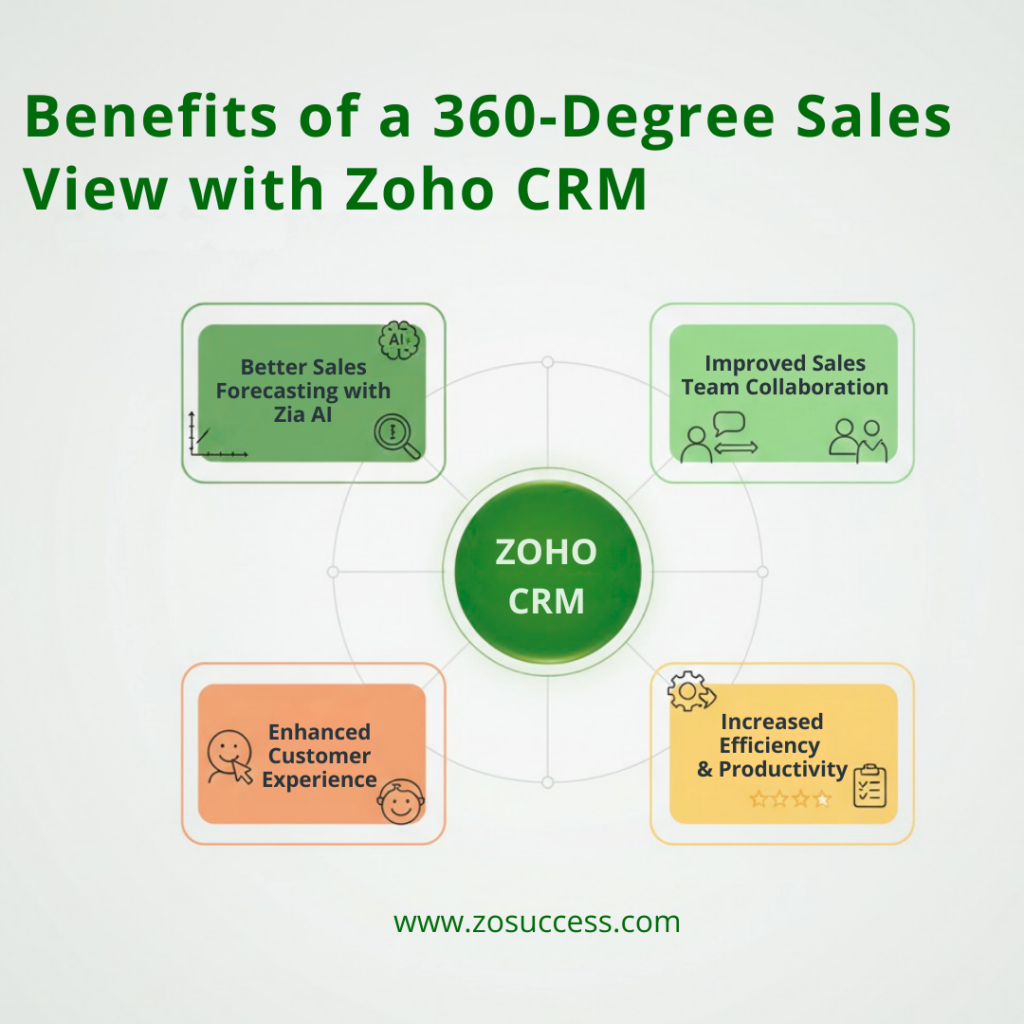
Benefits of a 360-Degree Sales View with Zoho CRM
Implementing a 360-degree sales view through Zoho CRM empowers your sales team with full visibility into every customer interaction, touchpoint, and transaction. This complete picture improves how your team works, engages with customers, and drives business results. Let’s explore the key benefits:
Better Sales Forecasting with Zia AI
Zoho CRM uses Zia, its built-in AI assistant, to help you predict future sales with more accuracy. Zia analyses past data like deal history, client behaviour, win/loss trends, and team performance to generate predictive insights.
Key advantages:
- Know which deals are most likely to close
- Identify sales trends early
- Plan resources and targets confidently
By relying on data-driven predictions, your team can make smarter decisions and prepare for upcoming opportunities.
Improved Sales Team Collaboration
With all customer information stored in one central place, your team no longer needs to dig through emails, spreadsheets, or multiple tools to get updates.
With a unified Zoho CRM system, you can:
- Share customer notes, activities, and interactions in real time
- Avoid communication gaps across departments
- Assign tasks, share updates, and tag team members easily
This kind of centralised collaboration keeps everyone aligned, improves follow-ups, and reduces missed opportunities.
Enhanced Customer Experience
When your team has access to complete customer history — from first inquiry to last purchase and every touchpoint in between — they can deliver more relevant, personalized sales interactions.
Zoho CRM helps you:
- Understand customer preferences, buying patterns, and past issues
- Tailor conversations and offers based on real needs
- Follow up at the right time with the right message
This builds stronger customer relationships and leads to higher satisfaction and loyalty.
Increased Efficiency & Productivity
Manually entering data and managing information from disconnected sources wastes valuable time. Zoho CRM automates many of these tasks so your team can focus on selling.
Automation benefits include:
- Auto-lead assignment based on region or source
- Automatic follow-up reminders and alerts
- Real-time dashboards to track performance
The result? Faster response times, fewer errors, and more closed deals.
Best Practices for Maintaining an Effective 360-Degree Sales View
Building a 360-degree sales view in Zoho CRM is just the beginning. To truly benefit from it, you need to maintain and optimize it continuously. Below are best practices that will help you keep your CRM data reliable, your processes smooth, and your team productive.
Ensure Data Accuracy & Consistency
A 360-degree view is only useful when the data behind it is clean and up to date.
What you should do:
- Regularly update records to reflect the latest customer information
- Remove duplicate entries to avoid confusion and clutter
- Validate data from third-party integrations to ensure consistency across platforms
- Use mandatory fields and validation rules in Zoho CRM to maintain input standards
Keeping your CRM clean ensures that your team makes decisions based on reliable information.
Leverage AI & Automation with Zia
Zoho’s built-in AI, Zia, is a powerful tool to automate routine tasks and deliver intelligent sales insights.
Use Zia to:
- Score leads are automatically based on behaviour and past engagement
- Get sales suggestions like the best time to contact a lead
- Receive alerts when deals are going cold or customers are disengaging
Automation ensures that no opportunity is missed and frees up your team to focus on closing deals.
Train Your Sales Team
Even the best CRM system won’t deliver results unless your team knows how to use it effectively.
Tips for training:
- Conduct regular workshops or webinars to teach new features
- Create simple user guides or videos tailored to your team’s processes
- Encourage teams to use Zoho’s mobile CRM app for updates on the go
- Assign a CRM champion or admin to guide users and address issues
A well-trained team can fully leverage CRM tools, leading to better adoption and results.
Monitor Performance with Reports & Dashboards
A 360-degree view is most powerful when it helps you track and analyse performance in real time.
How Zoho Analytics helps:
- Create custom dashboards to monitor KPIs like lead conversion rate, deal velocity, or sales target progress
- Use drill-down reports to identify bottlenecks or trends
- Set up automated email reports to keep stakeholders informed
Data-driven reporting allows managers to take proactive steps and stay aligned with goals.
Regularly Refine Your Customer Relationship Management Approach
CRM strategies should evolve as your business grows. Regularly reviewing your processes ensures continued success.
Steps to optimize:
- Conduct monthly or quarterly reviews of CRM workflows
- Get feedback from users on what’s working and what’s not
- Use Zoho CRM’s audit logs to track system changes and improve accountability
- Integrate new tools or features as your business needs change
An adaptable CRM setup keeps your sales system aligned with customer expectations and market demands.
Conclusion
Having a 360-degree sales view helps your business understand customers better, improve sales, and make smarter decisions. When your data is spread across different tools, it’s hard to get the full picture. That’s where Zoho CRM makes a big difference.
Zoho CRM brings all your sales data—leads, emails, deals, support, and more—into one place. With powerful tools like Zia AI, automation, and easy integrations, your sales team can work faster, stay organized, and close more deals with confidence.
Our team of CRM specialists is here to guide you every step of the way. Whether you’re just exploring or ready to implement, we’ll help you unlock the full potential of Zoho CRM.
Connect with our experts or Start Your Free Trial today to experience a smarter, more connected way to sell.


 “ZOSuccess” is the Zoho Consulting Practice of Dhruvsoft Services Private Limited – a leading Zoho Advanced Partner from India – providing services worldwide …